

| Flutter combines [a Dart framework](https://github.com/flutter/flutter) with a high-performance [engine](https://github.com/flutter/flutter/tree/main/engine). | |
| The Flutter Engine is a portable runtime for high-quality cross-platform | |
| applications. It implements Flutter's core libraries, including animation and | |
| graphics, file and network I/O, accessibility support, plugin architecture, and | |
| a Dart runtime and toolchain for developing, compiling, and running Flutter | |
| applications. | |
| ## Anatomy of a Flutter app | |
| The following diagram gives an overview of the pieces that make up a regular | |
| Flutter app with one engine generated by `flutter create`. It shows where the | |
| Flutter Engine sits in this stack, highlights API boundaries, and identifies the | |
| repositories where the individual pieces live. The legend below clarifies some | |
| of the terminology commonly used to describe the pieces of a Flutter app. | |
| <img src="https://raw.githubusercontent.com/flutter/flutter/main/docs/engine/app_anatomy.svg?sanitize=true" alt="Flutter Architecture Diagram" width="40%"/> | |
| #### Dart App | |
| * Composes widgets into the desired UI. | |
| * Implements business logic. | |
| * Owned by app developer. | |
| #### Framework ([source code](https://github.com/flutter/flutter/tree/main/packages/flutter/lib)) | |
| * Provides higher-level API to build high-quality apps (e.g. widgets, | |
| hit-testing, gesture detection, accessibility, text input, etc.). | |
| * Composites the app's widget tree into a scene. | |
| #### Engine ([source code](https://github.com/flutter/flutter/tree/main/engine/src/flutter/shell/common)) | |
| * Responsible for rasterizing composited scenes. | |
| * Provides low-level implementation of Flutter's core APIs (e.g. graphics, text | |
| layout, Dart runtime, etc.). | |
| * Exposes its functionality via its **dart:ui API** to the framework. | |
| * Integrates with a specific platform via the Engine's **Embedder API**. | |
| #### Embedder ([source code](https://github.com/flutter/flutter/tree/main/engine/src/flutter/shell/platform)) | |
| * Coordinates with the underlying operating system for access to services like | |
| rendering surfaces, accessibility, and input. | |
| * Manages the event loop. | |
| * Exposes **platform-specific API** to integrate the Embedder into apps. | |
| #### Runner | |
| * Composes the pieces exposed by the platform-specific API of the Embedder into | |
| an app package runnable on the target platform. | |
| * Part of app template generated by `flutter create`, owned by app developer. | |
| ## Architecture overview | |
| Flutter's engine takes core technologies, Skia, a 2D graphics rendering library, | |
| and Dart, a VM for a garbage-collected object-oriented language, and hosts them | |
| in a shell. Different platforms have different shells, for example we have | |
| shells for | |
| [Android](https://github.com/flutter/flutter/tree/main/engine/src/flutter/shell/platform/android) | |
| and [iOS](https://github.com/flutter/flutter/tree/main/engine/src/flutter/shell/platform/darwin). We | |
| also have an [embedder | |
| API](https://github.com/flutter/flutter/tree/main/engine/src/flutter/shell/platform/embedder) which | |
| allows Flutter's engine to be used as a library (see [Custom Flutter Engine | |
| Embedders](../engine/Custom-Flutter-Engine-Embedders.md)). | |
| The shells implement platform-specific code such as communicating with IMEs | |
| (on-screen keyboards) and the system's application lifecycle events. | |
| The Dart VM implements the normal Dart core libraries, plus an additional | |
| library called `dart:ui` to provide low-level access to Skia features and the | |
| shell. The shells can also communicate directly to Dart code via [Platform | |
| Channels](https://flutter.io/platform-channels/) which bypass the engine. | |
| 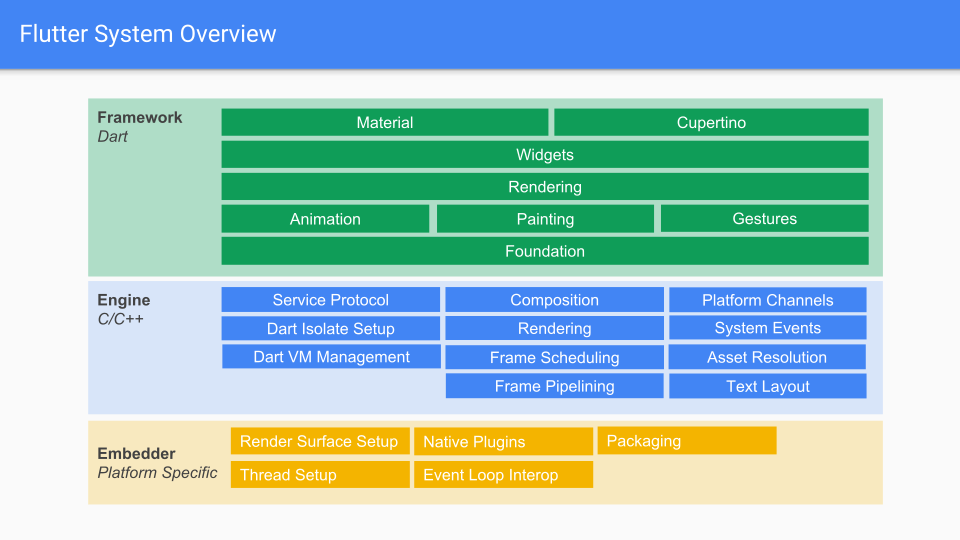 | |
| ## Threading | |
| ### Overview | |
| The Flutter engine does not create or manage its own threads. Instead, it is the | |
| responsibility of the embedder to create and manage threads (and their message | |
| loops) for the Flutter engine. The embedder gives the Flutter engine task | |
| runners for the threads it manages. In addition to the threads managed by the | |
| embedder for the engine, the Dart VM also has its own thread pool. Neither the | |
| Flutter engine nor the embedder have any access to the threads in this pool. | |
| ### Task Runner Configuration | |
| The Flutter engine requires the embedder to give it references to 4 task | |
| runners. The engine does not care if the references are to the same task runner, | |
| or, if multiple task runners are serviced on the same thread. For optimum | |
| performance, the embedder should create a dedicated thread per task runner. | |
| Though the engine does not care about the threads the task runners are serviced | |
| on, it does expect that the threading configuration remain stable for the entire | |
| lifetime of the engine. That is, once the embedder decides to service a task | |
| runner on a particular thread, it should execute tasks for that task runner only | |
| on that one thread (till the engine is torn down). | |
| The main task runners are: | |
| * Platform Task Runner | |
| * UI Task Runner | |
| * Raster Task Runner | |
| * IO Task Runner | |
| ### Platform Task Runner | |
| This is the task runner for the thread the embedder considers as its main | |
| thread. For example, this is typically the [Android Main | |
| Thread](https://developer.android.com/guide/components/processes-and-threads.html) | |
| or the [Main | |
| Thread](https://developer.apple.com/documentation/foundation/nsthread/1412704-ismainthread?language=objc) | |
| referenced by Foundation on Apple platforms. | |
| Any significance assigned to the thread for this task runner is entirely | |
| assigned by the embedder. The Flutter engine assigns no special meaning to this | |
| thread. In fact, multiple Flutter engines can be launched with platform task | |
| runners based on different threads. This is how the Flutter Content Handler in | |
| Fuchsia works. A new Flutter engine is created in the process for each Flutter | |
| application and a new platform thread is created for each engine. | |
| Interacting with the Flutter engine in any way must happen on the platform | |
| thread. Interacting with the engine on any other thread will trip assertions in | |
| unoptimized builds and is not thread safe in release builds. There are numerous | |
| components in the Flutter engine that are not thread safe. Once the Flutter | |
| engine is set up and running, the embedder does not have to post tasks to any of | |
| the task runners used to configure the engine as long as all accesses to the | |
| embedder API are made on the platform thread. | |
| In addition to being the thread on which the embedder interacts with the engine | |
| after it is launched, this task runner also executes any pending platform | |
| messages. This is handy because accessing most platform APIs is only safe on the | |
| platform’s main thread. Plugins don’t have to rethread their calls to the main | |
| thread. If plugins manage their own worker threads, it is their responsibility | |
| to queue responses back onto the platform thread before they can be submitted | |
| back to the engine for processing by Dart code. The rule of always interacting | |
| with the engine on the platform thread holds here. | |
| Even though blocking the platform thread for inordinate amounts of time will not | |
| block the Flutter rendering pipeline, platforms do impose restrictions on | |
| expensive operations on this thread. So it is advised that any expensive work in | |
| response to platform messages be performed on separate worker threads (unrelated | |
| to the four threads discussed above) before having the responses queued back on | |
| the the platform thread for submission to the engine. Not doing so may result in | |
| platform-specific watchdogs terminating the application. Embeddings such as | |
| Android and iOS also uses the platform thread to pipe through user input events. | |
| A blocked platform thread can also cause gestures to be dropped. | |
| ### UI Task Runner | |
| The UI task runner is where the engine executes all Dart code for the root | |
| isolate. The root isolate is a special isolate that has the necessary bindings | |
| for Flutter to function. This isolate runs the application's main Dart code. | |
| Bindings are set up on this isolate by the engine to schedule and submit frames. | |
| For each frame that Flutter has to render: | |
| * The root isolate has to tell the engine that a frame needs to be rendered. | |
| * The engine will ask the platform that it should be notified on the next vsync. | |
| * The platform waits for the next vsync. | |
| * On vsync, the engine will wake up the Dart code and [perform the | |
| following](https://api.flutter.dev/flutter/widgets/WidgetsBinding/drawFrame.html): | |
| * Update animation interpolators. | |
| * Rebuild the widgets in the application in a build phase. | |
| * Lay out the newly constructed and widgets and paint them into a tree of | |
| layers that are immediately submitted to the engine. Nothing is actually | |
| rasterized here; only a description of what needs to be painted is | |
| constructed as part of the paint phase. | |
| * Construct or update a tree of nodes containing semantic information about | |
| widgets on screen. This is used to update platform specific accessibility | |
| components. | |
| Apart from building frames for the engine to eventually render, the root isolate | |
| also executes all responses for platform plugin messages, timers, microtasks and | |
| asynchronous I/O (from sockets, file handles, etc.). | |
| Since the UI thread constructs the layer tree that determines what the engine | |
| will eventually paint onto the screen, it is the source of truth for everything | |
| on the screen. Consequently, performing long synchronous operations on this | |
| thread will cause jank in Flutter applications (a few milliseconds is enough to | |
| miss the next frame!). Long operations can typically only be caused by Dart code | |
| since the engine will not schedule any native code tasks on this task runner. | |
| Because of this, this task runner (or thread) is typically referred to as the | |
| Dart thread. It is possible for the embedder to post tasks onto this task | |
| runner. This may cause jank in Flutter and embedders are advised not to do this | |
| and instead assign a dedicated thread for this task runner. | |
| If it is unavoidable for Dart code to perform expensive work, it is advised that | |
| this code be moved into a separate [Dart | |
| isolate](https://api.flutter.dev/flutter/dart-isolate/dart-isolate-library.html) | |
| (e.g. using the | |
| [`compute`](https://api.flutter.dev/flutter/foundation/compute-constant.html) | |
| method). Dart code executing on a non-root isolate executes on a thread from a | |
| Dart VM managed thread pool. This cannot cause jank in a Flutter application. | |
| Terminating the root isolate will also terminate all isolates spawned by that | |
| root isolate. Also, non-root isolates are incapable of scheduling frames and do | |
| not have bindings that the Flutter framework depends on. Due to this, you cannot | |
| interact with the Flutter framework in any meaningful way on the secondary | |
| isolate. Use secondary isolates for tasks that require heavy computation. | |
| ### Raster Task Runner | |
| The raster task runner executes tasks that need to access the rasterizer | |
| (usually backed by GPU) on the device. The layer tree created by the Dart code | |
| on the UI task runner is client-rendering-API agnostic. That is, the same layer | |
| tree can be used to render a frame using OpenGL, Vulkan, software or really any | |
| other backend configured for Skia. Components on the GPU task runner take the | |
| layer tree and construct the appropriate draw commands. The raster task runner | |
| components are also responsible for setting up all the GPU resources for a | |
| particular frame. This includes talking to the platform to set up the | |
| framebuffer, managing surface lifecycle, and ensuring that textures and buffers | |
| for a particular frame are fully prepared. | |
| Depending on how long it takes for the layer tree to be processed and the device | |
| to finish displaying the frame, the various components of the raster task runner | |
| may delay scheduling of further frames on the UI thread. Typically, the UI and | |
| raster task runners are on different threads. In such cases, the raster thread | |
| can be in the process of submitting a frame to the GPU while the UI thread is | |
| already preparing the next frame. The pipelining mechanism makes sure that the | |
| UI thread does not schedule too much work for the rasterizer. | |
| Since the raster task runner components can introduce frame scheduling delays on | |
| the UI thread, performing too much work on the raster thread will cause jank in | |
| Flutter applications. Typically, there is no opportunity for the user to perform | |
| custom tasks on this task runner because neither platform code nor Dart code can | |
| access this task runner. However, it is still possible for the embedder to | |
| schedule tasks on this thread. For this reason, it is recommended that embedders | |
| provide a dedicated thread for the raster task runner per engine instance. | |
| ### IO Task Runner | |
| All the task runners mentioned so far have pretty strong restrictions on the | |
| kinds of operations that can be performed on this. Blocking the platform task | |
| runner for an inordinate amount of time may trigger the platform's watchdog, and | |
| blocking either the UI or raster task runners will cause jank in Flutter | |
| applications. However, there are tasks necessary for the raster thread that | |
| require doing some very expensive work. This expensive work is performed on the | |
| IO task runner. | |
| The main function of the IO task runner is reading compressed images from an | |
| asset store and making sure these images are ready for rendering on the raster | |
| task runner. To make sure a texture is ready for rendering, it first has to be | |
| read as a blob of compressed data (typically PNG, JPEG, etc.) from an asset | |
| store, decompressed into a GPU friendly format and uploaded to the GPU. These | |
| operations are expensive and will cause jank if performed on the raster task | |
| runner. Since only the raster task runner can access the GPU, the IO task runner | |
| components set up a special context that is in the same sharegroup as the main | |
| raster task runner context. This happens very early during engine setup and is | |
| also the reason there is a single task runner for IO tasks. In reality, the | |
| reading of the compressed bytes and decompression can happen on a thread pool. | |
| The IO task runner is special because access to the context is only safe from a | |
| specific thread. The only way to get a resource like | |
| [`ui.Image`](https://api.flutter.dev/flutter/dart-ui/Image-class.html) | |
| is via an async call; this allows the framework to talk to the IO runner so that | |
| it can asynchronously perform all the texture operations mentioned. The image | |
| can then be immediately used in a frame without the raster thread having to do | |
| expensive work. | |
| There is no way for user code to access this thread either via Dart or native | |
| plugins. Even the embedder is free to schedule tasks on this thread that are | |
| fairly expensive. This won’t cause jank in Flutter applications but may delay | |
| having the futures images and other resources be resolved in a timely manner. | |
| Even so, it is recommended that custom embedders set up a dedicated thread for | |
| this task runner. | |
| ### Flutter Engine Groups | |
| There are two different ways to create Flutter engines which has ramifications | |
| on how threading is managed across multiple Flutter engines. Flutter engines can | |
| be instantiated directly or through the FlutterEngineGroup APIs | |
| [[ios](https://github.com/flutter/flutter/blob/main/engine/src/flutter/shell/platform/darwin/ios/framework/Headers/FlutterEngineGroup.h), | |
| [android](https://api.flutter.dev/javadoc/io/flutter/embedding/engine/FlutterEngineGroup.html)]. | |
| If an engine is instantiated directly, it gets its own engine threads and [dart isolate | |
| group](https://dart.dev/language/concurrency#performance-and-isolate-groups). | |
| However, all engines instantiated with a FlutterEngineGroup share the same | |
| threads across the group. Each engine has their own root isolate but share the | |
| same UI task runner, Dart isolate group and source code. | |
| As a result engines in a FlutterEngineGroup will have a smaller memory | |
| footprint, faster startup latency, and better CPU core usage with shared threads | |
| and a shared thread pool for isolates. | |
| ### Current Platform Specific Threading Configurations | |
| As mentioned, the engine can support multiple threading configurations, the | |
| configurations currently used by the supported platforms are: | |
| #### iOS | |
| A dedicated thread is created for the UI, raster and IO task runners per engine | |
| instance. All engine instances share the same platform thread and task runner. | |
| #### Android | |
| A dedicated thread is created for the UI, raster and IO task runners per engine | |
| instance. All engine instances share the same platform thread and task runner. | |
| #### Fuchsia | |
| A dedicated thread is created for the UI, raster, IO and Platform task runners | |
| per engine instance. | |
| #### macOS | |
| A dedicated thread is created for the UI, raster and IO task runners per engine | |
| instance. All engine instances share the same platform thread and task runner. | |
| #### Windows | |
| A dedicated thread is created for the UI, raster and IO task runners per engine | |
| instance. All engine instances share the same platform thread and task runner. | |
| #### Linux | |
| A dedicated thread is created for the UI and IO task runners per engine | |
| instance. The platform thread and the raster thread are the same thread. All | |
| engine instances share the same platform thread and task runner. | |
| #### Flutter Tester (used by `flutter test`) | |
| The same main thread is used for the UI, raster, IO and Platform task runners | |
| for the single instance engine supported in the process. | |
| ## Text rendering | |
| Our text rendering stack is as follows: | |
| * A minikin derivative we call libtxt (font selection, bidi, line breaking). | |
| * HarfBuzz (glyph selection, shaping). | |
| * Skia (rendering/GPU back-end), which uses FreeType for font rendering on | |
| Android and Fuchsia, and CoreGraphics for font rendering on iOS. |