| # Camera Web Plugin |
| |
| The web implementation of [`camera`][camera]. |
| |
| *Note*: This plugin is under development. See [missing implementation](#missing-implementation). |
| |
| ## Usage |
| |
| ### Depend on the package |
| |
| This package is not an [endorsed implementation](https://flutter.dev/docs/development/packages-and-plugins/developing-packages#endorsed-federated-plugin) |
| of the google_maps_flutter plugin yet, so you'll need to [add it explicitly](https://pub.dev/packages/camera_web/install). |
| |
| ## Example |
| |
| Find the example in the [`camera` package](https://pub.dev/packages/camera#example). |
| |
| ## Limitations on the web platform |
| |
| ### Camera devices |
| |
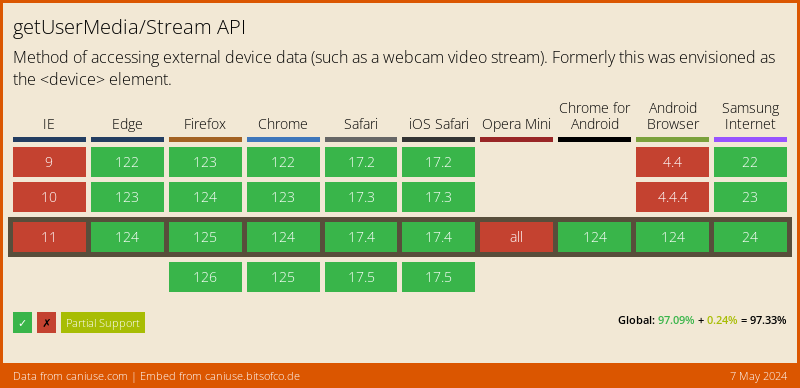
| The camera devices are accessed with [Stream Web API](https://developer.mozilla.org/en-US/docs/Web/API/Media_Streams_API) |
| with the following [browser support](https://caniuse.com/stream): |
| |
|  |
| |
| Accessing camera devices requires a [secure browsing context](https://developer.mozilla.org/en-US/docs/Web/Security/Secure_Contexts). |
| Broadly speaking, this means that you need to serve your web application over HTTPS |
| (or `localhost` for local development). For insecure contexts |
| `CameraPlatform.availableCameras` might throw a `CameraException` with the |
| `permissionDenied` error code. |
| |
| ### Device orientation |
| |
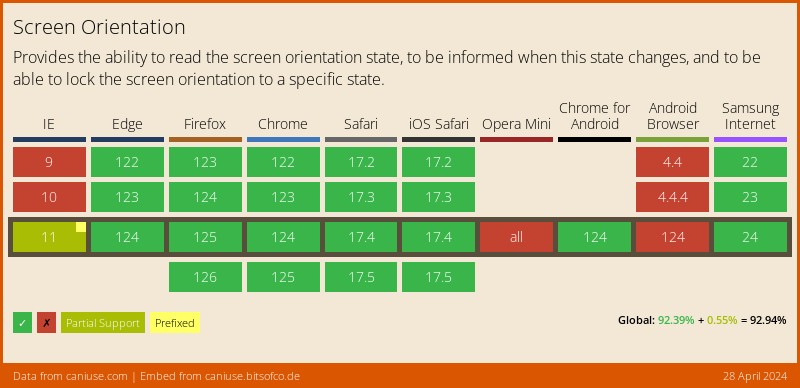
| The device orientation implementation is backed by [`Screen Orientation Web API`](https://www.w3.org/TR/screen-orientation/) |
| with the following [browser support](https://caniuse.com/screen-orientation): |
| |
|  |
| |
| For the browsers that do not support the device orientation: |
| |
| - `CameraPlatform.onDeviceOrientationChanged` returns an empty stream. |
| - `CameraPlatform.lockCaptureOrientation` and `CameraPlatform.unlockCaptureOrientation` |
| throw a `PlatformException` with the `orientationNotSupported` error code. |
| |
| ### Flash mode and zoom level |
| |
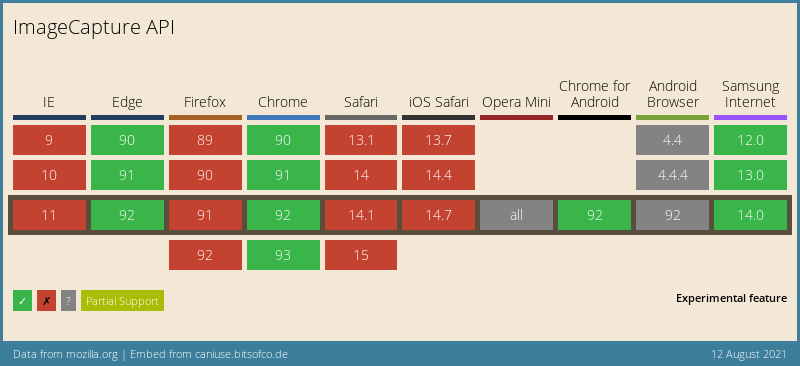
| The flash mode and zoom level implementation is backed by [Image Capture Web API](https://w3c.github.io/mediacapture-image/) |
| with the following [browser support](https://caniuse.com/mdn-api_imagecapture): |
| |
|  |
| |
| For the browsers that do not support the flash mode: |
| |
| - `CameraPlatform.setFlashMode` throws a `PlatformException` with the |
| `torchModeNotSupported` error code. |
| |
| For the browsers that do not support the zoom level: |
| |
| - `CameraPlatform.getMaxZoomLevel`, `CameraPlatform.getMinZoomLevel` and |
| `CameraPlatform.setZoomLevel` throw a `PlatformException` with the |
| `zoomLevelNotSupported` error code. |
| |
| ### Taking a picture |
| |
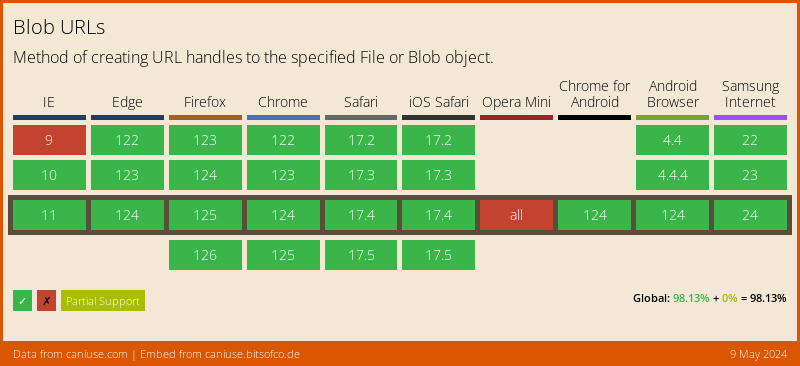
| The image capturing implementation is backed by [`URL.createObjectUrl` Web API](https://developer.mozilla.org/en-US/docs/Web/API/URL/createObjectURL) |
| with the following [browser support](https://caniuse.com/bloburls): |
| |
|  |
| |
| The web platform does not support `dart:io`. Attempts to display a captured image |
| using `Image.file` will throw an error. The capture image contains a network-accessible |
| URL pointing to a location within the browser (blob) and can be displayed using |
| `Image.network` or `Image.memory` after loading the image bytes to memory. |
| |
| See the example below: |
| |
| ```dart |
| if (kIsWeb) { |
| Image.network(capturedImage.path); |
| } else { |
| Image.file(File(capturedImage.path)); |
| } |
| ``` |
| |
| ## Missing implementation |
| |
| The web implementation of [`camera`][camera] is missing the following features: |
| |
| - Video recording ([in progress](https://github.com/flutter/plugins/pull/4210)) |
| - Exposure mode, point and offset |
| - Focus mode and point |
| - Sensor orientation |
| - Image format group |
| - Streaming of frames |
| |
| <!-- Links --> |
| [camera]: https://pub.dev/packages/camera |
