| // Copyright 2014 The Flutter Authors. All rights reserved. |
| // Use of this source code is governed by a BSD-style license that can be |
| // found in the LICENSE file. |
| |
| /// @docImport 'package:flutter/cupertino.dart'; |
| /// @docImport 'package:flutter/material.dart'; |
| /// @docImport 'package:flutter/services.dart'; |
| /// |
| /// @docImport 'app.dart'; |
| /// @docImport 'display_feature_sub_screen.dart'; |
| /// @docImport 'overlay.dart'; |
| /// @docImport 'safe_area.dart'; |
| /// @docImport 'system_context_menu.dart'; |
| /// @docImport 'view.dart'; |
| library; |
| |
| import 'dart:math' as math; |
| import 'dart:ui' as ui; |
| |
| import 'package:flutter/foundation.dart'; |
| import 'package:flutter/gestures.dart'; |
| |
| import 'basic.dart'; |
| import 'binding.dart'; |
| import 'debug.dart'; |
| import 'framework.dart'; |
| import 'inherited_model.dart'; |
| |
| // Examples can assume: |
| // late BuildContext context; |
| |
| /// Whether in portrait or landscape. |
| enum Orientation { |
| /// Taller than wide. |
| portrait, |
| |
| /// Wider than tall. |
| landscape, |
| } |
| |
| /// Specifies a part of MediaQueryData to depend on. |
| /// |
| /// [MediaQuery] contains a large number of related properties. Widgets frequently |
| /// depend on only a few of these attributes. For example, a widget that needs to |
| /// rebuild when the [MediaQueryData.textScaler] changes does not need to be |
| /// notified when the [MediaQueryData.size] changes. Specifying an aspect avoids |
| /// unnecessary rebuilds. |
| enum _MediaQueryAspect { |
| /// Specifies the aspect corresponding to [MediaQueryData.size]. |
| size, |
| |
| /// Specifies the aspect corresponding to [MediaQueryData.orientation]. |
| orientation, |
| |
| /// Specifies the aspect corresponding to [MediaQueryData.devicePixelRatio]. |
| devicePixelRatio, |
| |
| /// Specifies the aspect corresponding to [MediaQueryData.textScaleFactor]. |
| textScaleFactor, |
| |
| /// Specifies the aspect corresponding to [MediaQueryData.textScaler]. |
| textScaler, |
| |
| /// Specifies the aspect corresponding to [MediaQueryData.platformBrightness]. |
| platformBrightness, |
| |
| /// Specifies the aspect corresponding to [MediaQueryData.padding]. |
| padding, |
| |
| /// Specifies the aspect corresponding to [MediaQueryData.viewInsets]. |
| viewInsets, |
| |
| /// Specifies the aspect corresponding to [MediaQueryData.systemGestureInsets]. |
| systemGestureInsets, |
| |
| /// Specifies the aspect corresponding to [MediaQueryData.viewPadding]. |
| viewPadding, |
| |
| /// Specifies the aspect corresponding to [MediaQueryData.alwaysUse24HourFormat]. |
| alwaysUse24HourFormat, |
| |
| /// Specifies the aspect corresponding to [MediaQueryData.accessibleNavigation]. |
| accessibleNavigation, |
| |
| /// Specifies the aspect corresponding to [MediaQueryData.invertColors]. |
| invertColors, |
| |
| /// Specifies the aspect corresponding to [MediaQueryData.highContrast]. |
| highContrast, |
| |
| /// Specifies the aspect corresponding to [MediaQueryData.onOffSwitchLabels]. |
| onOffSwitchLabels, |
| |
| /// Specifies the aspect corresponding to [MediaQueryData.disableAnimations]. |
| disableAnimations, |
| |
| /// Specifies the aspect corresponding to [MediaQueryData.boldText]. |
| boldText, |
| |
| /// Specifies the aspect corresponding to [MediaQueryData.navigationMode]. |
| navigationMode, |
| |
| /// Specifies the aspect corresponding to [MediaQueryData.gestureSettings]. |
| gestureSettings, |
| |
| /// Specifies the aspect corresponding to [MediaQueryData.displayFeatures]. |
| displayFeatures, |
| |
| /// Specifies the aspect corresponding to [MediaQueryData.supportsShowingSystemContextMenu]. |
| supportsShowingSystemContextMenu, |
| } |
| |
| /// Information about a piece of media (e.g., a window). |
| /// |
| /// For example, the [MediaQueryData.size] property contains the width and |
| /// height of the current window. |
| /// |
| /// To obtain individual attributes in a [MediaQueryData], prefer to use the |
| /// attribute-specific functions of [MediaQuery] over obtaining the entire |
| /// [MediaQueryData] and accessing its members. |
| /// {@macro flutter.widgets.media_query.MediaQuery.useSpecific} |
| /// |
| /// To obtain the entire current [MediaQueryData] for a given [BuildContext], |
| /// use the [MediaQuery.of] function. This can be useful if you are going to use |
| /// [copyWith] to replace the [MediaQueryData] with one with an updated |
| /// property. |
| /// |
| /// ## Insets and Padding |
| /// |
| /// 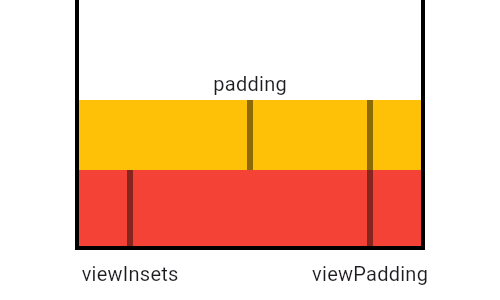 |
| /// |
| /// This diagram illustrates how [padding] relates to [viewPadding] and |
| /// [viewInsets], shown here in its simplest configuration, as the difference |
| /// between the two. In cases when the viewInsets exceed the viewPadding, like |
| /// when a software keyboard is shown below, padding goes to zero rather than a |
| /// negative value. Therefore, padding is calculated by taking |
| /// `max(0.0, viewPadding - viewInsets)`. |
| /// |
| /// {@animation 300 300 https://flutter.github.io/assets-for-api-docs/assets/widgets/window_padding.mp4} |
| /// |
| /// In this diagram, the black areas represent system UI that the app cannot |
| /// draw over. The red area represents view padding that the application may not |
| /// be able to detect gestures in and may not want to draw in. The grey area |
| /// represents the system keyboard, which can cover over the bottom view padding |
| /// when visible. |
| /// |
| /// MediaQueryData includes three [EdgeInsets] values: |
| /// [padding], [viewPadding], and [viewInsets]. These values reflect the |
| /// configuration of the device and are used and optionally consumed by widgets |
| /// that position content within these insets. The padding value defines areas |
| /// that might not be completely visible, like the display "notch" on the iPhone |
| /// X. The viewInsets value defines areas that aren't visible at all, typically |
| /// because they're obscured by the device's keyboard. Similar to viewInsets, |
| /// viewPadding does not differentiate padding in areas that may be obscured. |
| /// For example, by using the viewPadding property, padding would defer to the |
| /// iPhone "safe area" regardless of whether a keyboard is showing. |
| /// |
| /// {@youtube 560 315 https://www.youtube.com/watch?v=ceCo8U0XHqw} |
| /// |
| /// The viewInsets and viewPadding are independent values, they're |
| /// measured from the edges of the MediaQuery widget's bounds. Together they |
| /// inform the [padding] property. The bounds of the top level MediaQuery |
| /// created by [WidgetsApp] are the same as the window that contains the app. |
| /// |
| /// Widgets whose layouts consume space defined by [viewInsets], [viewPadding], |
| /// or [padding] should enclose their children in secondary MediaQuery |
| /// widgets that reduce those properties by the same amount. |
| /// The [removePadding], [removeViewPadding], and [removeViewInsets] methods are |
| /// useful for this. |
| /// |
| /// See also: |
| /// |
| /// * [Scaffold], [SafeArea], [CupertinoTabScaffold], and |
| /// [CupertinoPageScaffold], all of which are informed by [padding], |
| /// [viewPadding], and [viewInsets]. |
| @immutable |
| class MediaQueryData { |
| /// Creates data for a media query with explicit values. |
| /// |
| /// In a typical application, calling this constructor directly is rarely |
| /// needed. Consider using [MediaQueryData.fromView] to create data based on a |
| /// [dart:ui.FlutterView], or [MediaQueryData.copyWith] to create a new copy |
| /// of [MediaQueryData] with updated properties from a base [MediaQueryData]. |
| const MediaQueryData({ |
| this.size = Size.zero, |
| this.devicePixelRatio = 1.0, |
| @Deprecated( |
| 'Use textScaler instead. ' |
| 'Use of textScaleFactor was deprecated in preparation for the upcoming nonlinear text scaling support. ' |
| 'This feature was deprecated after v3.12.0-2.0.pre.', |
| ) |
| double textScaleFactor = 1.0, |
| TextScaler textScaler = _kUnspecifiedTextScaler, |
| this.platformBrightness = Brightness.light, |
| this.padding = EdgeInsets.zero, |
| this.viewInsets = EdgeInsets.zero, |
| this.systemGestureInsets = EdgeInsets.zero, |
| this.viewPadding = EdgeInsets.zero, |
| this.alwaysUse24HourFormat = false, |
| this.accessibleNavigation = false, |
| this.invertColors = false, |
| this.highContrast = false, |
| this.onOffSwitchLabels = false, |
| this.disableAnimations = false, |
| this.boldText = false, |
| this.navigationMode = NavigationMode.traditional, |
| this.gestureSettings = const DeviceGestureSettings(touchSlop: kTouchSlop), |
| this.displayFeatures = const <ui.DisplayFeature>[], |
| this.supportsShowingSystemContextMenu = false, |
| }) : _textScaleFactor = textScaleFactor, |
| _textScaler = textScaler, |
| assert( |
| identical(textScaler, _kUnspecifiedTextScaler) || textScaleFactor == 1.0, |
| 'textScaleFactor is deprecated and cannot be specified when textScaler is specified.', |
| ); |
| |
| /// Deprecated. Use [MediaQueryData.fromView] instead. |
| /// |
| /// This constructor was operating on a single window assumption. In |
| /// preparation for Flutter's upcoming multi-window support, it has been |
| /// deprecated. |
| @Deprecated( |
| 'Use MediaQueryData.fromView instead. ' |
| 'This constructor was deprecated in preparation for the upcoming multi-window support. ' |
| 'This feature was deprecated after v3.7.0-32.0.pre.', |
| ) |
| factory MediaQueryData.fromWindow(ui.FlutterView window) = MediaQueryData.fromView; |
| |
| /// Creates data for a [MediaQuery] based on the given `view`. |
| /// |
| /// If provided, the `platformData` is used to fill in the platform-specific |
| /// aspects of the newly created [MediaQueryData]. If `platformData` is null, |
| /// the `view`'s [PlatformDispatcher] is consulted to construct the |
| /// platform-specific data. |
| /// |
| /// Data which is exposed directly on the [FlutterView] is considered |
| /// view-specific. Data which is only exposed via the |
| /// [FlutterView.platformDispatcher] property is considered platform-specific. |
| /// |
| /// Callers of this method should ensure that they also register for |
| /// notifications so that the [MediaQueryData] can be updated when any data |
| /// used to construct it changes. Notifications to consider are: |
| /// |
| /// * [WidgetsBindingObserver.didChangeMetrics] or |
| /// [dart:ui.PlatformDispatcher.onMetricsChanged], |
| /// * [WidgetsBindingObserver.didChangeAccessibilityFeatures] or |
| /// [dart:ui.PlatformDispatcher.onAccessibilityFeaturesChanged], |
| /// * [WidgetsBindingObserver.didChangeTextScaleFactor] or |
| /// [dart:ui.PlatformDispatcher.onTextScaleFactorChanged], |
| /// * [WidgetsBindingObserver.didChangePlatformBrightness] or |
| /// [dart:ui.PlatformDispatcher.onPlatformBrightnessChanged]. |
| /// |
| /// The last three notifications are only relevant if no `platformData` is |
| /// provided. If `platformData` is provided, callers should ensure to call |
| /// this method again when it changes to keep the constructed [MediaQueryData] |
| /// updated. |
| /// |
| /// In general, [MediaQuery.of], and its associated "...Of" methods, are the |
| /// appropriate way to obtain [MediaQueryData] from a widget. This `fromView` |
| /// constructor is primarily for use in the implementation of the framework |
| /// itself. |
| /// |
| /// See also: |
| /// |
| /// * [MediaQuery.fromView], which constructs [MediaQueryData] from a provided |
| /// [FlutterView], makes it available to descendant widgets, and sets up |
| /// the appropriate notification listeners to keep the data updated. |
| MediaQueryData.fromView(ui.FlutterView view, {MediaQueryData? platformData}) |
| : size = view.physicalSize / view.devicePixelRatio, |
| devicePixelRatio = view.devicePixelRatio, |
| _textScaleFactor = 1.0, // _textScaler is the source of truth. |
| _textScaler = _textScalerFromView(view, platformData), |
| platformBrightness = |
| platformData?.platformBrightness ?? view.platformDispatcher.platformBrightness, |
| padding = EdgeInsets.fromViewPadding(view.padding, view.devicePixelRatio), |
| viewPadding = EdgeInsets.fromViewPadding(view.viewPadding, view.devicePixelRatio), |
| viewInsets = EdgeInsets.fromViewPadding(view.viewInsets, view.devicePixelRatio), |
| systemGestureInsets = EdgeInsets.fromViewPadding( |
| view.systemGestureInsets, |
| view.devicePixelRatio, |
| ), |
| accessibleNavigation = |
| platformData?.accessibleNavigation ?? |
| view.platformDispatcher.accessibilityFeatures.accessibleNavigation, |
| invertColors = |
| platformData?.invertColors ?? view.platformDispatcher.accessibilityFeatures.invertColors, |
| disableAnimations = |
| platformData?.disableAnimations ?? |
| view.platformDispatcher.accessibilityFeatures.disableAnimations, |
| boldText = platformData?.boldText ?? view.platformDispatcher.accessibilityFeatures.boldText, |
| highContrast = |
| platformData?.highContrast ?? view.platformDispatcher.accessibilityFeatures.highContrast, |
| onOffSwitchLabels = |
| platformData?.onOffSwitchLabels ?? |
| view.platformDispatcher.accessibilityFeatures.onOffSwitchLabels, |
| alwaysUse24HourFormat = |
| platformData?.alwaysUse24HourFormat ?? view.platformDispatcher.alwaysUse24HourFormat, |
| navigationMode = platformData?.navigationMode ?? NavigationMode.traditional, |
| gestureSettings = DeviceGestureSettings.fromView(view), |
| displayFeatures = view.displayFeatures, |
| supportsShowingSystemContextMenu = |
| platformData?.supportsShowingSystemContextMenu ?? |
| view.platformDispatcher.supportsShowingSystemContextMenu; |
| |
| static TextScaler _textScalerFromView(ui.FlutterView view, MediaQueryData? platformData) { |
| final double scaleFactor = |
| platformData?.textScaleFactor ?? view.platformDispatcher.textScaleFactor; |
| return scaleFactor == 1.0 ? TextScaler.noScaling : TextScaler.linear(scaleFactor); |
| } |
| |
| /// The size of the media in logical pixels (e.g, the size of the screen). |
| /// |
| /// Logical pixels are roughly the same visual size across devices. Physical |
| /// pixels are the size of the actual hardware pixels on the device. The |
| /// number of physical pixels per logical pixel is described by the |
| /// [devicePixelRatio]. |
| /// |
| /// Prefer using [MediaQuery.sizeOf] over [MediaQuery.of]`.size` to get the |
| /// size, since the former will only notify of changes in [size], while the |
| /// latter will notify for all [MediaQueryData] changes. |
| /// |
| /// For widgets drawn in an [Overlay], do not assume that the size of the |
| /// [Overlay] is the size of the [MediaQuery]'s size. Nested overlays can have |
| /// different sizes. |
| /// |
| /// ## Troubleshooting |
| /// |
| /// It is considered bad practice to cache and later use the size returned by |
| /// `MediaQuery.sizeOf(context)`. It will make the application non-responsive |
| /// and might lead to unexpected behaviors. |
| /// |
| /// For instance, during startup, especially in release mode, the first |
| /// returned size might be [Size.zero]. The size will be updated when the |
| /// native platform reports the actual resolution. Using [MediaQuery.sizeOf] |
| /// will ensure that when the size changes, any widgets depending on the size |
| /// are automatically rebuilt. |
| /// |
| /// See the article on [Creating responsive and adaptive |
| /// apps](https://docs.flutter.dev/ui/adaptive-responsive) |
| /// for an introduction. |
| /// |
| /// See also: |
| /// |
| /// * [FlutterView.physicalSize], which returns the size of the view in physical pixels. |
| /// * [FlutterView.display], which returns reports display information like size, and refresh rate. |
| /// * [MediaQuery.sizeOf], a method to find and depend on the size defined for |
| /// a [BuildContext]. |
| final Size size; |
| |
| /// The number of device pixels for each logical pixel. This number might not |
| /// be a power of two. Indeed, it might not even be an integer. For example, |
| /// the Nexus 6 has a device pixel ratio of 3.5. |
| final double devicePixelRatio; |
| |
| /// Deprecated. Will be removed in a future version of Flutter. Use |
| /// [textScaler] instead. |
| /// |
| /// The number of font pixels for each logical pixel. |
| /// |
| /// For example, if the text scale factor is 1.5, text will be 50% larger than |
| /// the specified font size. |
| /// |
| /// See also: |
| /// |
| /// * [MediaQuery.textScaleFactorOf], a method to find and depend on the |
| /// textScaleFactor defined for a [BuildContext]. |
| @Deprecated( |
| 'Use textScaler instead. ' |
| 'Use of textScaleFactor was deprecated in preparation for the upcoming nonlinear text scaling support. ' |
| 'This feature was deprecated after v3.12.0-2.0.pre.', |
| ) |
| double get textScaleFactor => textScaler.textScaleFactor; |
| // TODO(LongCatIsLooong): remove this after textScaleFactor is removed. To |
| // maintain backward compatibility and also keep the const constructor this |
| // has to be kept as a private field. |
| // https://github.com/flutter/flutter/issues/128825 |
| final double _textScaleFactor; |
| |
| /// The font scaling strategy to use for laying out textual contents. |
| /// |
| /// If this [MediaQueryData] is created by the [MediaQueryData.fromView] |
| /// constructor, this property reflects the platform's preferred text scaling |
| /// strategy, and may change as the user changes the scaling factor in the |
| /// operating system's accessibility settings. |
| /// |
| /// See also: |
| /// |
| /// * [MediaQuery.textScalerOf], a method to find and depend on the |
| /// [textScaler] defined for a [BuildContext]. |
| /// * [TextPainter], a class that lays out and paints text. |
| TextScaler get textScaler { |
| // The constructor was called with an explicitly specified textScaler value, |
| // we assume the caller is migrated and ignore _textScaleFactor. |
| if (!identical(_kUnspecifiedTextScaler, _textScaler)) { |
| return _textScaler; |
| } |
| return _textScaleFactor == 1.0 |
| // textScaleFactor and textScaler from the constructor are consistent. |
| ? TextScaler.noScaling |
| // The constructor was called with an explicitly specified textScaleFactor, |
| // we assume the caller is unmigrated and ignore _textScaler. |
| : TextScaler.linear(_textScaleFactor); |
| } |
| |
| final TextScaler _textScaler; |
| |
| /// The current brightness mode of the host platform. |
| /// |
| /// For example, starting in Android Pie, battery saver mode asks all apps to |
| /// render in a "dark mode". |
| /// |
| /// Not all platforms necessarily support a concept of brightness mode. Those |
| /// platforms will report [Brightness.light] in this property. |
| /// |
| /// See also: |
| /// |
| /// * [MediaQuery.platformBrightnessOf], a method to find and depend on the |
| /// platformBrightness defined for a [BuildContext]. |
| final Brightness platformBrightness; |
| |
| /// The parts of the display that are completely obscured by system UI, |
| /// typically by the device's keyboard. |
| /// |
| /// When a mobile device's keyboard is visible `viewInsets.bottom` |
| /// corresponds to the top of the keyboard. |
| /// |
| /// This value is independent of the [padding] and [viewPadding]. viewPadding |
| /// is measured from the edges of the [MediaQuery] widget's bounds. Padding is |
| /// calculated based on the viewPadding and viewInsets. The bounds of the top |
| /// level MediaQuery created by [WidgetsApp] are the same as the window |
| /// (often the mobile device screen) that contains the app. |
| /// |
| /// {@youtube 560 315 https://www.youtube.com/watch?v=ceCo8U0XHqw} |
| /// |
| /// See also: |
| /// |
| /// * [FlutterView], which provides some additional detail about this property |
| /// and how it relates to [padding] and [viewPadding]. |
| final EdgeInsets viewInsets; |
| |
| /// The parts of the display that are partially obscured by system UI, |
| /// typically by the hardware display "notches" or the system status bar. |
| /// |
| /// If you consumed this padding (e.g. by building a widget that envelops or |
| /// accounts for this padding in its layout in such a way that children are |
| /// no longer exposed to this padding), you should remove this padding |
| /// for subsequent descendants in the widget tree by inserting a new |
| /// [MediaQuery] widget using the [MediaQuery.removePadding] factory. |
| /// |
| /// Padding is derived from the values of [viewInsets] and [viewPadding]. |
| /// |
| /// {@youtube 560 315 https://www.youtube.com/watch?v=ceCo8U0XHqw} |
| /// |
| /// See also: |
| /// |
| /// * [FlutterView], which provides some additional detail about this |
| /// property and how it relates to [viewInsets] and [viewPadding]. |
| /// * [SafeArea], a widget that consumes this padding with a [Padding] widget |
| /// and automatically removes it from the [MediaQuery] for its child. |
| final EdgeInsets padding; |
| |
| /// The parts of the display that are partially obscured by system UI, |
| /// typically by the hardware display "notches" or the system status bar. |
| /// |
| /// This value remains the same regardless of whether the system is reporting |
| /// other obstructions in the same physical area of the screen. For example, a |
| /// software keyboard on the bottom of the screen that may cover and consume |
| /// the same area that requires bottom padding will not affect this value. |
| /// |
| /// This value is independent of the [padding] and [viewInsets]: their values |
| /// are measured from the edges of the [MediaQuery] widget's bounds. The |
| /// bounds of the top level MediaQuery created by [WidgetsApp] are the |
| /// same as the window that contains the app. On mobile devices, this will |
| /// typically be the full screen. |
| /// |
| /// {@youtube 560 315 https://www.youtube.com/watch?v=ceCo8U0XHqw} |
| /// |
| /// See also: |
| /// |
| /// * [FlutterView], which provides some additional detail about this |
| /// property and how it relates to [padding] and [viewInsets]. |
| final EdgeInsets viewPadding; |
| |
| /// The areas along the edges of the display where the system consumes |
| /// certain input events and blocks delivery of those events to the app. |
| /// |
| /// Starting with Android Q, simple swipe gestures that start within the |
| /// [systemGestureInsets] areas are used by the system for page navigation |
| /// and may not be delivered to the app. Taps and swipe gestures that begin |
| /// with a long-press are delivered to the app, but simple press-drag-release |
| /// swipe gestures which begin within the area defined by [systemGestureInsets] |
| /// may not be. |
| /// |
| /// Apps should avoid locating gesture detectors within the system gesture |
| /// insets area. Apps should feel free to put visual elements within |
| /// this area. |
| /// |
| /// This property is currently only expected to be set to a non-default value |
| /// on Android starting with version Q. |
| /// |
| /// {@tool dartpad} |
| /// For apps that might be deployed on Android Q devices with full gesture |
| /// navigation enabled, use [systemGestureInsets] with [Padding] |
| /// to avoid having the left and right edges of the [Slider] from appearing |
| /// within the area reserved for system gesture navigation. |
| /// |
| /// By default, [Slider]s expand to fill the available width. So, we pad the |
| /// left and right sides. |
| /// |
| /// ** See code in examples/api/lib/widgets/media_query/media_query_data.system_gesture_insets.0.dart ** |
| /// {@end-tool} |
| final EdgeInsets systemGestureInsets; |
| |
| /// Whether to use 24-hour format when formatting time. |
| /// |
| /// The behavior of this flag is different across platforms: |
| /// |
| /// - On Android this flag is reported directly from the user settings called |
| /// "Use 24-hour format". It applies to any locale used by the application, |
| /// whether it is the system-wide locale, or the custom locale set by the |
| /// application. |
| /// - On iOS this flag is set to true when the user setting called "24-Hour |
| /// Time" is set or the system-wide locale's default uses 24-hour |
| /// formatting. |
| final bool alwaysUse24HourFormat; |
| |
| /// Whether the user is using an accessibility service like TalkBack or |
| /// VoiceOver to interact with the application. |
| /// |
| /// When this setting is true, features such as timeouts should be disabled or |
| /// have minimum durations increased. |
| /// |
| /// See also: |
| /// |
| /// * [dart:ui.PlatformDispatcher.accessibilityFeatures], where the setting originates. |
| final bool accessibleNavigation; |
| |
| /// Whether the device is inverting the colors of the platform. |
| /// |
| /// This flag is currently only updated on iOS devices. |
| /// |
| /// See also: |
| /// |
| /// * [dart:ui.PlatformDispatcher.accessibilityFeatures], where the setting |
| /// originates. |
| final bool invertColors; |
| |
| /// Whether the user requested a high contrast between foreground and background |
| /// content on iOS, via Settings -> Accessibility -> Increase Contrast. |
| /// |
| /// This flag is currently only updated on iOS devices that are running iOS 13 |
| /// or above. |
| final bool highContrast; |
| |
| /// Whether the user requested to show on/off labels inside switches on iOS, |
| /// via Settings -> Accessibility -> Display & Text Size -> On/Off Labels. |
| /// |
| /// See also: |
| /// |
| /// * [dart:ui.PlatformDispatcher.accessibilityFeatures], where the setting |
| /// originates. |
| final bool onOffSwitchLabels; |
| |
| /// Whether the platform is requesting that animations be disabled or reduced |
| /// as much as possible. |
| /// |
| /// See also: |
| /// |
| /// * [dart:ui.PlatformDispatcher.accessibilityFeatures], where the setting |
| /// originates. |
| final bool disableAnimations; |
| |
| /// Whether the platform is requesting that text be drawn with a bold font |
| /// weight. |
| /// |
| /// See also: |
| /// |
| /// * [dart:ui.PlatformDispatcher.accessibilityFeatures], where the setting |
| /// originates. |
| final bool boldText; |
| |
| /// Describes the navigation mode requested by the platform. |
| /// |
| /// Some user interfaces are better navigated using a directional pad (DPAD) |
| /// or arrow keys, and for those interfaces, some widgets need to handle these |
| /// directional events differently. In order to know when to do that, these |
| /// widgets will look for the navigation mode in effect for their context. |
| /// |
| /// For instance, in a television interface, [NavigationMode.directional] |
| /// should be set, so that directional navigation is used to navigate away |
| /// from a text field using the DPAD. In contrast, on a regular desktop |
| /// application with the [navigationMode] set to [NavigationMode.traditional], |
| /// the arrow keys are used to move the cursor instead of navigating away. |
| /// |
| /// The [NavigationMode] values indicate the type of navigation to be used in |
| /// a widget subtree for those widgets sensitive to it. |
| final NavigationMode navigationMode; |
| |
| /// The gesture settings for the view this media query is derived from. |
| /// |
| /// This contains platform specific configuration for gesture behavior, |
| /// such as touch slop. These settings should be favored for configuring |
| /// gesture behavior over the framework constants. |
| final DeviceGestureSettings gestureSettings; |
| |
| /// {@macro dart.ui.ViewConfiguration.displayFeatures} |
| /// |
| /// See also: |
| /// |
| /// * [dart:ui.DisplayFeatureType], which lists the different types of |
| /// display features and explains the differences between them. |
| /// * [dart:ui.DisplayFeatureState], which lists the possible states for |
| /// folding features ([dart:ui.DisplayFeatureType.fold] and |
| /// [dart:ui.DisplayFeatureType.hinge]). |
| final List<ui.DisplayFeature> displayFeatures; |
| |
| /// Whether showing the system context menu is supported. |
| /// |
| /// For example, on iOS 16.0 and above, the system text selection context menu |
| /// may be shown instead of the Flutter-drawn context menu in order to avoid |
| /// the iOS clipboard access notification when the "Paste" button is pressed. |
| /// |
| /// See also: |
| /// |
| /// * [SystemContextMenuController] and [SystemContextMenu], which may be |
| /// used to show the system context menu when this flag indicates it's |
| /// supported. |
| final bool supportsShowingSystemContextMenu; |
| |
| /// The orientation of the media (e.g., whether the device is in landscape or |
| /// portrait mode). |
| Orientation get orientation { |
| return size.width > size.height ? Orientation.landscape : Orientation.portrait; |
| } |
| |
| /// Creates a copy of this media query data but with the given fields replaced |
| /// with the new values. |
| /// |
| /// The `textScaler` parameter and `textScaleFactor` parameter must not be |
| /// both specified. |
| MediaQueryData copyWith({ |
| Size? size, |
| double? devicePixelRatio, |
| @Deprecated( |
| 'Use textScaler instead. ' |
| 'Use of textScaleFactor was deprecated in preparation for the upcoming nonlinear text scaling support. ' |
| 'This feature was deprecated after v3.12.0-2.0.pre.', |
| ) |
| double? textScaleFactor, |
| TextScaler? textScaler, |
| Brightness? platformBrightness, |
| EdgeInsets? padding, |
| EdgeInsets? viewPadding, |
| EdgeInsets? viewInsets, |
| EdgeInsets? systemGestureInsets, |
| bool? alwaysUse24HourFormat, |
| bool? highContrast, |
| bool? onOffSwitchLabels, |
| bool? disableAnimations, |
| bool? invertColors, |
| bool? accessibleNavigation, |
| bool? boldText, |
| NavigationMode? navigationMode, |
| DeviceGestureSettings? gestureSettings, |
| List<ui.DisplayFeature>? displayFeatures, |
| bool? supportsShowingSystemContextMenu, |
| }) { |
| assert(textScaleFactor == null || textScaler == null); |
| if (textScaleFactor != null) { |
| textScaler ??= TextScaler.linear(textScaleFactor); |
| } |
| return MediaQueryData( |
| size: size ?? this.size, |
| devicePixelRatio: devicePixelRatio ?? this.devicePixelRatio, |
| textScaler: textScaler ?? this.textScaler, |
| platformBrightness: platformBrightness ?? this.platformBrightness, |
| padding: padding ?? this.padding, |
| viewPadding: viewPadding ?? this.viewPadding, |
| viewInsets: viewInsets ?? this.viewInsets, |
| systemGestureInsets: systemGestureInsets ?? this.systemGestureInsets, |
| alwaysUse24HourFormat: alwaysUse24HourFormat ?? this.alwaysUse24HourFormat, |
| invertColors: invertColors ?? this.invertColors, |
| highContrast: highContrast ?? this.highContrast, |
| onOffSwitchLabels: onOffSwitchLabels ?? this.onOffSwitchLabels, |
| disableAnimations: disableAnimations ?? this.disableAnimations, |
| accessibleNavigation: accessibleNavigation ?? this.accessibleNavigation, |
| boldText: boldText ?? this.boldText, |
| navigationMode: navigationMode ?? this.navigationMode, |
| gestureSettings: gestureSettings ?? this.gestureSettings, |
| displayFeatures: displayFeatures ?? this.displayFeatures, |
| supportsShowingSystemContextMenu: |
| supportsShowingSystemContextMenu ?? this.supportsShowingSystemContextMenu, |
| ); |
| } |
| |
| /// Creates a copy of this media query data but with the given [padding]s |
| /// replaced with zero. |
| /// |
| /// If all four of the `removeLeft`, `removeTop`, `removeRight`, and |
| /// `removeBottom` arguments are false (the default), then this |
| /// [MediaQueryData] is returned unmodified. |
| /// |
| /// See also: |
| /// |
| /// * [MediaQuery.removePadding], which uses this method to remove [padding] |
| /// from the ambient [MediaQuery]. |
| /// * [SafeArea], which both removes the padding from the [MediaQuery] and |
| /// adds a [Padding] widget. |
| /// * [removeViewInsets], the same thing but for [viewInsets]. |
| /// * [removeViewPadding], the same thing but for [viewPadding]. |
| MediaQueryData removePadding({ |
| bool removeLeft = false, |
| bool removeTop = false, |
| bool removeRight = false, |
| bool removeBottom = false, |
| }) { |
| if (!(removeLeft || removeTop || removeRight || removeBottom)) { |
| return this; |
| } |
| return copyWith( |
| padding: padding.copyWith( |
| left: removeLeft ? 0.0 : null, |
| top: removeTop ? 0.0 : null, |
| right: removeRight ? 0.0 : null, |
| bottom: removeBottom ? 0.0 : null, |
| ), |
| viewPadding: viewPadding.copyWith( |
| left: removeLeft ? math.max(0.0, viewPadding.left - padding.left) : null, |
| top: removeTop ? math.max(0.0, viewPadding.top - padding.top) : null, |
| right: removeRight ? math.max(0.0, viewPadding.right - padding.right) : null, |
| bottom: removeBottom ? math.max(0.0, viewPadding.bottom - padding.bottom) : null, |
| ), |
| ); |
| } |
| |
| /// Creates a copy of this media query data but with the given [viewInsets] |
| /// replaced with zero. |
| /// |
| /// If all four of the `removeLeft`, `removeTop`, `removeRight`, and |
| /// `removeBottom` arguments are false (the default), then this |
| /// [MediaQueryData] is returned unmodified. |
| /// |
| /// See also: |
| /// |
| /// * [MediaQuery.removeViewInsets], which uses this method to remove |
| /// [viewInsets] from the ambient [MediaQuery]. |
| /// * [removePadding], the same thing but for [padding]. |
| /// * [removeViewPadding], the same thing but for [viewPadding]. |
| MediaQueryData removeViewInsets({ |
| bool removeLeft = false, |
| bool removeTop = false, |
| bool removeRight = false, |
| bool removeBottom = false, |
| }) { |
| if (!(removeLeft || removeTop || removeRight || removeBottom)) { |
| return this; |
| } |
| return copyWith( |
| viewPadding: viewPadding.copyWith( |
| left: removeLeft ? math.max(0.0, viewPadding.left - viewInsets.left) : null, |
| top: removeTop ? math.max(0.0, viewPadding.top - viewInsets.top) : null, |
| right: removeRight ? math.max(0.0, viewPadding.right - viewInsets.right) : null, |
| bottom: removeBottom ? math.max(0.0, viewPadding.bottom - viewInsets.bottom) : null, |
| ), |
| viewInsets: viewInsets.copyWith( |
| left: removeLeft ? 0.0 : null, |
| top: removeTop ? 0.0 : null, |
| right: removeRight ? 0.0 : null, |
| bottom: removeBottom ? 0.0 : null, |
| ), |
| ); |
| } |
| |
| /// Creates a copy of this media query data but with the given [viewPadding] |
| /// replaced with zero. |
| /// |
| /// If all four of the `removeLeft`, `removeTop`, `removeRight`, and |
| /// `removeBottom` arguments are false (the default), then this |
| /// [MediaQueryData] is returned unmodified. |
| /// |
| /// See also: |
| /// |
| /// * [MediaQuery.removeViewPadding], which uses this method to remove |
| /// [viewPadding] from the ambient [MediaQuery]. |
| /// * [removePadding], the same thing but for [padding]. |
| /// * [removeViewInsets], the same thing but for [viewInsets]. |
| MediaQueryData removeViewPadding({ |
| bool removeLeft = false, |
| bool removeTop = false, |
| bool removeRight = false, |
| bool removeBottom = false, |
| }) { |
| if (!(removeLeft || removeTop || removeRight || removeBottom)) { |
| return this; |
| } |
| return copyWith( |
| padding: padding.copyWith( |
| left: removeLeft ? 0.0 : null, |
| top: removeTop ? 0.0 : null, |
| right: removeRight ? 0.0 : null, |
| bottom: removeBottom ? 0.0 : null, |
| ), |
| viewPadding: viewPadding.copyWith( |
| left: removeLeft ? 0.0 : null, |
| top: removeTop ? 0.0 : null, |
| right: removeRight ? 0.0 : null, |
| bottom: removeBottom ? 0.0 : null, |
| ), |
| ); |
| } |
| |
| /// Creates a copy of this media query data by removing [displayFeatures] that |
| /// are completely outside the given sub-screen and adjusting the [padding], |
| /// [viewInsets] and [viewPadding] to be zero on the sides that are not |
| /// included in the sub-screen. |
| /// |
| /// Returns unmodified [MediaQueryData] if the sub-screen coincides with the |
| /// available screen space. |
| /// |
| /// Asserts in debug mode, if the given sub-screen is outside the available |
| /// screen space. |
| /// |
| /// See also: |
| /// |
| /// * [DisplayFeatureSubScreen], which removes the display features that |
| /// split the screen, from the [MediaQuery] and adds a [Padding] widget to |
| /// position the child to match the selected sub-screen. |
| MediaQueryData removeDisplayFeatures(Rect subScreen) { |
| assert( |
| subScreen.left >= 0.0 && |
| subScreen.top >= 0.0 && |
| subScreen.right <= size.width && |
| subScreen.bottom <= size.height, |
| "'subScreen' argument cannot be outside the bounds of the screen", |
| ); |
| if (subScreen.size == size && subScreen.topLeft == Offset.zero) { |
| return this; |
| } |
| final double rightInset = size.width - subScreen.right; |
| final double bottomInset = size.height - subScreen.bottom; |
| return copyWith( |
| padding: EdgeInsets.only( |
| left: math.max(0.0, padding.left - subScreen.left), |
| top: math.max(0.0, padding.top - subScreen.top), |
| right: math.max(0.0, padding.right - rightInset), |
| bottom: math.max(0.0, padding.bottom - bottomInset), |
| ), |
| viewPadding: EdgeInsets.only( |
| left: math.max(0.0, viewPadding.left - subScreen.left), |
| top: math.max(0.0, viewPadding.top - subScreen.top), |
| right: math.max(0.0, viewPadding.right - rightInset), |
| bottom: math.max(0.0, viewPadding.bottom - bottomInset), |
| ), |
| viewInsets: EdgeInsets.only( |
| left: math.max(0.0, viewInsets.left - subScreen.left), |
| top: math.max(0.0, viewInsets.top - subScreen.top), |
| right: math.max(0.0, viewInsets.right - rightInset), |
| bottom: math.max(0.0, viewInsets.bottom - bottomInset), |
| ), |
| displayFeatures: |
| displayFeatures |
| .where( |
| (ui.DisplayFeature displayFeature) => subScreen.overlaps(displayFeature.bounds), |
| ) |
| .toList(), |
| ); |
| } |
| |
| @override |
| bool operator ==(Object other) { |
| if (other.runtimeType != runtimeType) { |
| return false; |
| } |
| return other is MediaQueryData && |
| other.size == size && |
| other.devicePixelRatio == devicePixelRatio && |
| other.textScaleFactor == textScaleFactor && |
| other.platformBrightness == platformBrightness && |
| other.padding == padding && |
| other.viewPadding == viewPadding && |
| other.viewInsets == viewInsets && |
| other.systemGestureInsets == systemGestureInsets && |
| other.alwaysUse24HourFormat == alwaysUse24HourFormat && |
| other.highContrast == highContrast && |
| other.onOffSwitchLabels == onOffSwitchLabels && |
| other.disableAnimations == disableAnimations && |
| other.invertColors == invertColors && |
| other.accessibleNavigation == accessibleNavigation && |
| other.boldText == boldText && |
| other.navigationMode == navigationMode && |
| other.gestureSettings == gestureSettings && |
| listEquals(other.displayFeatures, displayFeatures) && |
| other.supportsShowingSystemContextMenu == supportsShowingSystemContextMenu; |
| } |
| |
| @override |
| int get hashCode => Object.hash( |
| size, |
| devicePixelRatio, |
| textScaleFactor, |
| platformBrightness, |
| padding, |
| viewPadding, |
| viewInsets, |
| alwaysUse24HourFormat, |
| highContrast, |
| onOffSwitchLabels, |
| disableAnimations, |
| invertColors, |
| accessibleNavigation, |
| boldText, |
| navigationMode, |
| gestureSettings, |
| Object.hashAll(displayFeatures), |
| supportsShowingSystemContextMenu, |
| ); |
| |
| @override |
| String toString() { |
| final List<String> properties = <String>[ |
| 'size: $size', |
| 'devicePixelRatio: ${devicePixelRatio.toStringAsFixed(1)}', |
| 'textScaler: $textScaler', |
| 'platformBrightness: $platformBrightness', |
| 'padding: $padding', |
| 'viewPadding: $viewPadding', |
| 'viewInsets: $viewInsets', |
| 'systemGestureInsets: $systemGestureInsets', |
| 'alwaysUse24HourFormat: $alwaysUse24HourFormat', |
| 'accessibleNavigation: $accessibleNavigation', |
| 'highContrast: $highContrast', |
| 'onOffSwitchLabels: $onOffSwitchLabels', |
| 'disableAnimations: $disableAnimations', |
| 'invertColors: $invertColors', |
| 'boldText: $boldText', |
| 'navigationMode: ${navigationMode.name}', |
| 'gestureSettings: $gestureSettings', |
| 'displayFeatures: $displayFeatures', |
| 'supportsShowingSystemContextMenu: $supportsShowingSystemContextMenu', |
| ]; |
| return '${objectRuntimeType(this, 'MediaQueryData')}(${properties.join(', ')})'; |
| } |
| } |
| |
| /// Establishes a subtree in which media queries resolve to the given data. |
| /// |
| /// For example, to learn the size of the current view (e.g., |
| /// the [FlutterView] containing your app), you can use [MediaQuery.sizeOf]: |
| /// `MediaQuery.sizeOf(context)`. |
| /// |
| /// Querying the current media using specific methods (for example, |
| /// [MediaQuery.sizeOf] or [MediaQuery.paddingOf]) will cause your widget to |
| /// rebuild automatically whenever that specific property changes. |
| /// |
| /// {@template flutter.widgets.media_query.MediaQuery.useSpecific} |
| /// Querying using [MediaQuery.of] will cause your widget to rebuild |
| /// automatically whenever _any_ field of the [MediaQueryData] changes (e.g., if |
| /// the user rotates their device). Therefore, unless you are concerned with the |
| /// entire [MediaQueryData] object changing, prefer using the specific methods |
| /// (for example: [MediaQuery.sizeOf] and [MediaQuery.paddingOf]), as it will |
| /// rebuild more efficiently. |
| /// |
| /// If no [MediaQuery] is in scope then [MediaQuery.of] and the "...Of" methods |
| /// similar to [MediaQuery.sizeOf] will throw an exception. Alternatively, the |
| /// "maybe-" variant methods (such as [MediaQuery.maybeOf] and |
| /// [MediaQuery.maybeSizeOf]) can be used, which return null, instead of |
| /// throwing, when no [MediaQuery] is in scope. |
| /// {@endtemplate} |
| /// |
| /// {@youtube 560 315 https://www.youtube.com/watch?v=A3WrA4zAaPw} |
| /// |
| /// See also: |
| /// |
| /// * [WidgetsApp] and [MaterialApp], which introduce a [MediaQuery] and keep |
| /// it up to date with the current screen metrics as they change. |
| /// * [MediaQueryData], the data structure that represents the metrics. |
| class MediaQuery extends InheritedModel<_MediaQueryAspect> { |
| /// Creates a widget that provides [MediaQueryData] to its descendants. |
| const MediaQuery({super.key, required this.data, required super.child}); |
| |
| /// Creates a new [MediaQuery] that inherits from the ambient [MediaQuery] |
| /// from the given context, but removes the specified padding. |
| /// |
| /// This should be inserted into the widget tree when the [MediaQuery] padding |
| /// is consumed by a widget in such a way that the padding is no longer |
| /// exposed to the widget's descendants or siblings. |
| /// |
| /// The [context] argument must have a [MediaQuery] in scope. |
| /// |
| /// If all four of the `removeLeft`, `removeTop`, `removeRight`, and |
| /// `removeBottom` arguments are false (the default), then the returned |
| /// [MediaQuery] reuses the ambient [MediaQueryData] unmodified, which is not |
| /// particularly useful. |
| /// |
| /// See also: |
| /// |
| /// * [SafeArea], which both removes the padding from the [MediaQuery] and |
| /// adds a [Padding] widget. |
| /// * [MediaQueryData.padding], the affected property of the |
| /// [MediaQueryData]. |
| /// * [MediaQuery.removeViewInsets], the same thing but for [MediaQueryData.viewInsets]. |
| /// * [MediaQuery.removeViewPadding], the same thing but for |
| /// [MediaQueryData.viewPadding]. |
| MediaQuery.removePadding({ |
| super.key, |
| required BuildContext context, |
| bool removeLeft = false, |
| bool removeTop = false, |
| bool removeRight = false, |
| bool removeBottom = false, |
| required super.child, |
| }) : data = MediaQuery.of(context).removePadding( |
| removeLeft: removeLeft, |
| removeTop: removeTop, |
| removeRight: removeRight, |
| removeBottom: removeBottom, |
| ); |
| |
| /// Creates a new [MediaQuery] that inherits from the ambient [MediaQuery] |
| /// from the given context, but removes the specified view insets. |
| /// |
| /// This should be inserted into the widget tree when the [MediaQuery] view |
| /// insets are consumed by a widget in such a way that the view insets are no |
| /// longer exposed to the widget's descendants or siblings. |
| /// |
| /// The [context] argument must have a [MediaQuery] in scope. |
| /// |
| /// If all four of the `removeLeft`, `removeTop`, `removeRight`, and |
| /// `removeBottom` arguments are false (the default), then the returned |
| /// [MediaQuery] reuses the ambient [MediaQueryData] unmodified, which is not |
| /// particularly useful. |
| /// |
| /// See also: |
| /// |
| /// * [MediaQueryData.viewInsets], the affected property of the |
| /// [MediaQueryData]. |
| /// * [MediaQuery.removePadding], the same thing but for [MediaQueryData.padding]. |
| /// * [MediaQuery.removeViewPadding], the same thing but for |
| /// [MediaQueryData.viewPadding]. |
| MediaQuery.removeViewInsets({ |
| super.key, |
| required BuildContext context, |
| bool removeLeft = false, |
| bool removeTop = false, |
| bool removeRight = false, |
| bool removeBottom = false, |
| required super.child, |
| }) : data = MediaQuery.of(context).removeViewInsets( |
| removeLeft: removeLeft, |
| removeTop: removeTop, |
| removeRight: removeRight, |
| removeBottom: removeBottom, |
| ); |
| |
| /// Creates a new [MediaQuery] that inherits from the ambient [MediaQuery] |
| /// from the given context, but removes the specified view padding. |
| /// |
| /// This should be inserted into the widget tree when the [MediaQuery] view |
| /// padding is consumed by a widget in such a way that the view padding is no |
| /// longer exposed to the widget's descendants or siblings. |
| /// |
| /// The [context] argument must have a [MediaQuery] in scope. |
| /// |
| /// If all four of the `removeLeft`, `removeTop`, `removeRight`, and |
| /// `removeBottom` arguments are false (the default), then the returned |
| /// [MediaQuery] reuses the ambient [MediaQueryData] unmodified, which is not |
| /// particularly useful. |
| /// |
| /// See also: |
| /// |
| /// * [MediaQueryData.viewPadding], the affected property of the |
| /// [MediaQueryData]. |
| /// * [MediaQuery.removePadding], the same thing but for [MediaQueryData.padding]. |
| /// * [MediaQuery.removeViewInsets], the same thing but for [MediaQueryData.viewInsets]. |
| MediaQuery.removeViewPadding({ |
| super.key, |
| required BuildContext context, |
| bool removeLeft = false, |
| bool removeTop = false, |
| bool removeRight = false, |
| bool removeBottom = false, |
| required super.child, |
| }) : data = MediaQuery.of(context).removeViewPadding( |
| removeLeft: removeLeft, |
| removeTop: removeTop, |
| removeRight: removeRight, |
| removeBottom: removeBottom, |
| ); |
| |
| /// Deprecated. Use [MediaQuery.fromView] instead. |
| /// |
| /// This constructor was operating on a single window assumption. In |
| /// preparation for Flutter's upcoming multi-window support, it has been |
| /// deprecated. |
| /// |
| /// Replaced by [MediaQuery.fromView], which requires specifying the |
| /// [FlutterView] the [MediaQuery] is constructed for. The [FlutterView] can, |
| /// for example, be obtained from the context via [View.of] or from |
| /// [PlatformDispatcher.views]. |
| @Deprecated( |
| 'Use MediaQuery.fromView instead. ' |
| 'This constructor was deprecated in preparation for the upcoming multi-window support. ' |
| 'This feature was deprecated after v3.7.0-32.0.pre.', |
| ) |
| static Widget fromWindow({Key? key, required Widget child}) { |
| return _MediaQueryFromView( |
| key: key, |
| view: WidgetsBinding.instance.window, |
| ignoreParentData: true, |
| child: child, |
| ); |
| } |
| |
| /// Wraps the [child] in a [MediaQuery] which is built using data from the |
| /// provided [view]. |
| /// |
| /// The [MediaQuery] is constructed using the platform-specific data of the |
| /// surrounding [MediaQuery] and the view-specific data of the provided |
| /// [view]. If no surrounding [MediaQuery] exists, the platform-specific data |
| /// is generated from the [PlatformDispatcher] associated with the provided |
| /// [view]. Any information that's exposed via the [PlatformDispatcher] is |
| /// considered platform-specific. Data exposed directly on the [FlutterView] |
| /// (excluding its [FlutterView.platformDispatcher] property) is considered |
| /// view-specific. |
| /// |
| /// The injected [MediaQuery] automatically updates when any of the data used |
| /// to construct it changes. |
| static Widget fromView({Key? key, required FlutterView view, required Widget child}) { |
| return _MediaQueryFromView(key: key, view: view, child: child); |
| } |
| |
| /// Wraps the `child` in a [MediaQuery] with its [MediaQueryData.textScaler] |
| /// set to [TextScaler.noScaling]. |
| /// |
| /// The returned widget must be inserted in a widget tree below an existing |
| /// [MediaQuery] widget. |
| /// |
| /// This can be used to prevent, for example, icon fonts from scaling as the |
| /// user adjusts the platform's text scaling value. |
| static Widget withNoTextScaling({Key? key, required Widget child}) { |
| return Builder( |
| key: key, |
| builder: (BuildContext context) { |
| assert(debugCheckHasMediaQuery(context)); |
| return MediaQuery( |
| data: MediaQuery.of(context).copyWith(textScaler: TextScaler.noScaling), |
| child: child, |
| ); |
| }, |
| ); |
| } |
| |
| /// Wraps the `child` in a [MediaQuery] and applies [TextScaler.clamp] on the |
| /// current [MediaQueryData.textScaler]. |
| /// |
| /// The returned widget must be inserted in a widget tree below an existing |
| /// [MediaQuery] widget. |
| /// |
| /// This is a convenience function to restrict the range of the scaled text |
| /// size to `[minScaleFactor * fontSize, maxScaleFactor * fontSize]` (to |
| /// prevent excessive text scaling that would break the UI, for example). When |
| /// `minScaleFactor` equals `maxScaleFactor`, the scaler becomes |
| /// `TextScaler.linear(minScaleFactor)`. |
| static Widget withClampedTextScaling({ |
| Key? key, |
| double minScaleFactor = 0.0, |
| double maxScaleFactor = double.infinity, |
| required Widget child, |
| }) { |
| assert(maxScaleFactor >= minScaleFactor); |
| assert(!maxScaleFactor.isNaN); |
| assert(minScaleFactor.isFinite); |
| assert(minScaleFactor >= 0); |
| |
| return Builder( |
| builder: (BuildContext context) { |
| assert(debugCheckHasMediaQuery(context)); |
| final MediaQueryData data = MediaQuery.of(context); |
| return MediaQuery( |
| data: data.copyWith( |
| textScaler: data.textScaler.clamp( |
| minScaleFactor: minScaleFactor, |
| maxScaleFactor: maxScaleFactor, |
| ), |
| ), |
| child: child, |
| ); |
| }, |
| ); |
| } |
| |
| /// Contains information about the current media. |
| /// |
| /// For example, the [MediaQueryData.size] property contains the width and |
| /// height of the current window. |
| final MediaQueryData data; |
| |
| /// The data from the closest instance of this class that encloses the given |
| /// context. |
| /// |
| /// You can use this function to query the entire set of data held in the |
| /// current [MediaQueryData] object. When any of that information changes, |
| /// your widget will be scheduled to be rebuilt, keeping your widget |
| /// up-to-date. |
| /// |
| /// Since it is typical that the widget only requires a subset of properties |
| /// of the [MediaQueryData] object, prefer using the more specific methods |
| /// (for example: [MediaQuery.sizeOf] and [MediaQuery.paddingOf]), as those |
| /// methods will not cause a widget to rebuild when unrelated properties are |
| /// updated. |
| /// |
| /// Typical usage is as follows: |
| /// |
| /// ```dart |
| /// MediaQueryData media = MediaQuery.of(context); |
| /// ``` |
| /// |
| /// If there is no [MediaQuery] in scope, this method will throw a [TypeError] |
| /// exception in release builds, and throw a descriptive [FlutterError] in |
| /// debug builds. |
| /// |
| /// See also: |
| /// |
| /// * [maybeOf], which doesn't throw or assert if it doesn't find a |
| /// [MediaQuery] ancestor. It returns null instead. |
| /// * [sizeOf] and other specific methods for retrieving and depending on |
| /// changes of a specific value. |
| static MediaQueryData of(BuildContext context) { |
| return _of(context); |
| } |
| |
| static MediaQueryData _of(BuildContext context, [_MediaQueryAspect? aspect]) { |
| assert(debugCheckHasMediaQuery(context)); |
| return InheritedModel.inheritFrom<MediaQuery>(context, aspect: aspect)!.data; |
| } |
| |
| /// The data from the closest instance of this class that encloses the given |
| /// context, if any. |
| /// |
| /// Use this function if you want to allow situations where no [MediaQuery] is |
| /// in scope. Prefer using [MediaQuery.of] in situations where a media query |
| /// is always expected to exist. |
| /// |
| /// If there is no [MediaQuery] in scope, then this function will return null. |
| /// |
| /// You can use this function to query the entire set of data held in the |
| /// current [MediaQueryData] object. When any of that information changes, |
| /// your widget will be scheduled to be rebuilt, keeping your widget |
| /// up-to-date. |
| /// |
| /// Since it is typical that the widget only requires a subset of properties |
| /// of the [MediaQueryData] object, prefer using the more specific methods |
| /// (for example: [MediaQuery.maybeSizeOf] and [MediaQuery.maybePaddingOf]), |
| /// as those methods will not cause a widget to rebuild when unrelated |
| /// properties are updated. |
| /// |
| /// Typical usage is as follows: |
| /// |
| /// ```dart |
| /// MediaQueryData? mediaQuery = MediaQuery.maybeOf(context); |
| /// if (mediaQuery == null) { |
| /// // Do something else instead. |
| /// } |
| /// ``` |
| /// |
| /// See also: |
| /// |
| /// * [of], which will throw if it doesn't find a [MediaQuery] ancestor, |
| /// instead of returning null. |
| /// * [maybeSizeOf] and other specific methods for retrieving and depending on |
| /// changes of a specific value. |
| static MediaQueryData? maybeOf(BuildContext context) { |
| return _maybeOf(context); |
| } |
| |
| static MediaQueryData? _maybeOf(BuildContext context, [_MediaQueryAspect? aspect]) { |
| return InheritedModel.inheritFrom<MediaQuery>(context, aspect: aspect)?.data; |
| } |
| |
| /// Returns [MediaQueryData.size] from the nearest [MediaQuery] ancestor or |
| /// throws an exception, if no such ancestor exists. |
| /// |
| /// Use of this method will cause the given [context] to rebuild any time that |
| /// the [MediaQueryData.size] property of the ancestor [MediaQuery] changes. |
| /// |
| /// {@template flutter.widgets.media_query.MediaQuery.dontUseOf} |
| /// Prefer using this function over getting the attribute directly from the |
| /// [MediaQueryData] returned from [of], because using this function will only |
| /// rebuild the `context` when this specific attribute changes, not when _any_ |
| /// attribute changes. |
| /// {@endtemplate} |
| static Size sizeOf(BuildContext context) => _of(context, _MediaQueryAspect.size).size; |
| |
| /// Returns [MediaQueryData.size] from the nearest [MediaQuery] ancestor or |
| /// null, if no such ancestor exists. |
| /// |
| /// Use of this method will cause the given [context] to rebuild any time that |
| /// the [MediaQueryData.size] property of the ancestor [MediaQuery] changes. |
| /// |
| /// {@template flutter.widgets.media_query.MediaQuery.dontUseMaybeOf} |
| /// Prefer using this function over getting the attribute directly from the |
| /// [MediaQueryData] returned from [maybeOf], because using this function will |
| /// only rebuild the `context` when this specific attribute changes, not when |
| /// _any_ attribute changes. |
| /// {@endtemplate} |
| static Size? maybeSizeOf(BuildContext context) => _maybeOf(context, _MediaQueryAspect.size)?.size; |
| |
| /// Returns [MediaQueryData.orientation] for the nearest [MediaQuery] ancestor or |
| /// throws an exception, if no such ancestor exists. |
| /// |
| /// Use of this method will cause the given [context] to rebuild any time that |
| /// the [MediaQueryData.orientation] property of the ancestor [MediaQuery] changes. |
| /// |
| /// {@macro flutter.widgets.media_query.MediaQuery.dontUseOf} |
| static Orientation orientationOf(BuildContext context) => |
| _of(context, _MediaQueryAspect.orientation).orientation; |
| |
| /// Returns [MediaQueryData.orientation] for the nearest [MediaQuery] ancestor or |
| /// null, if no such ancestor exists. |
| /// |
| /// Use of this method will cause the given [context] to rebuild any time that |
| /// the [MediaQueryData.orientation] property of the ancestor [MediaQuery] changes. |
| /// |
| /// {@macro flutter.widgets.media_query.MediaQuery.dontUseMaybeOf} |
| static Orientation? maybeOrientationOf(BuildContext context) => |
| _maybeOf(context, _MediaQueryAspect.orientation)?.orientation; |
| |
| /// Returns [MediaQueryData.devicePixelRatio] for the nearest [MediaQuery] ancestor or |
| /// throws an exception, if no such ancestor exists. |
| /// |
| /// Use of this method will cause the given [context] to rebuild any time that |
| /// the [MediaQueryData.devicePixelRatio] property of the ancestor [MediaQuery] changes. |
| /// |
| /// {@macro flutter.widgets.media_query.MediaQuery.dontUseOf} |
| static double devicePixelRatioOf(BuildContext context) => |
| _of(context, _MediaQueryAspect.devicePixelRatio).devicePixelRatio; |
| |
| /// Returns [MediaQueryData.devicePixelRatio] for the nearest [MediaQuery] ancestor or |
| /// null, if no such ancestor exists. |
| /// |
| /// Use of this method will cause the given [context] to rebuild any time that |
| /// the [MediaQueryData.devicePixelRatio] property of the ancestor [MediaQuery] changes. |
| /// |
| /// {@macro flutter.widgets.media_query.MediaQuery.dontUseMaybeOf} |
| static double? maybeDevicePixelRatioOf(BuildContext context) => |
| _maybeOf(context, _MediaQueryAspect.devicePixelRatio)?.devicePixelRatio; |
| |
| /// Deprecated. Will be removed in a future version of Flutter. Use |
| /// [maybeTextScalerOf] instead. |
| /// |
| /// Returns [MediaQueryData.textScaleFactor] for the nearest [MediaQuery] ancestor or |
| /// 1.0, if no such ancestor exists. |
| /// |
| /// Use of this method will cause the given [context] to rebuild any time that |
| /// the [MediaQueryData.textScaleFactor] property of the ancestor [MediaQuery] changes. |
| /// |
| /// {@macro flutter.widgets.media_query.MediaQuery.dontUseOf} |
| @Deprecated( |
| 'Use textScalerOf instead. ' |
| 'Use of textScaleFactor was deprecated in preparation for the upcoming nonlinear text scaling support. ' |
| 'This feature was deprecated after v3.12.0-2.0.pre.', |
| ) |
| static double textScaleFactorOf(BuildContext context) => maybeTextScaleFactorOf(context) ?? 1.0; |
| |
| /// Deprecated. Will be removed in a future version of Flutter. Use |
| /// [maybeTextScalerOf] instead. |
| /// |
| /// Returns [MediaQueryData.textScaleFactor] for the nearest [MediaQuery] ancestor or |
| /// null, if no such ancestor exists. |
| /// |
| /// Use of this method will cause the given [context] to rebuild any time that |
| /// the [MediaQueryData.textScaleFactor] property of the ancestor [MediaQuery] |
| /// changes. |
| /// |
| /// {@macro flutter.widgets.media_query.MediaQuery.dontUseMaybeOf} |
| @Deprecated( |
| 'Use maybeTextScalerOf instead. ' |
| 'Use of textScaleFactor was deprecated in preparation for the upcoming nonlinear text scaling support. ' |
| 'This feature was deprecated after v3.12.0-2.0.pre.', |
| ) |
| static double? maybeTextScaleFactorOf(BuildContext context) => |
| _maybeOf(context, _MediaQueryAspect.textScaleFactor)?.textScaleFactor; |
| |
| /// Returns the [MediaQueryData.textScaler] for the nearest [MediaQuery] |
| /// ancestor or [TextScaler.noScaling] if no such ancestor exists. |
| /// |
| /// Use of this method will cause the given [context] to rebuild any time that |
| /// the [MediaQueryData.textScaler] property of the ancestor [MediaQuery] |
| /// changes. |
| /// |
| /// {@macro flutter.widgets.media_query.MediaQuery.dontUseOf} |
| static TextScaler textScalerOf(BuildContext context) => |
| maybeTextScalerOf(context) ?? TextScaler.noScaling; |
| |
| /// Returns the [MediaQueryData.textScaler] for the nearest [MediaQuery] |
| /// ancestor or null if no such ancestor exists. |
| /// |
| /// Use of this method will cause the given [context] to rebuild any time that |
| /// the [MediaQueryData.textScaler] property of the ancestor [MediaQuery] |
| /// changes. |
| /// |
| /// {@macro flutter.widgets.media_query.MediaQuery.dontUseMaybeOf} |
| static TextScaler? maybeTextScalerOf(BuildContext context) => |
| _maybeOf(context, _MediaQueryAspect.textScaler)?.textScaler; |
| |
| /// Returns [MediaQueryData.platformBrightness] for the nearest [MediaQuery] |
| /// ancestor or [Brightness.light], if no such ancestor exists. |
| /// |
| /// Use of this method will cause the given [context] to rebuild any time that |
| /// the [MediaQueryData.platformBrightness] property of the ancestor |
| /// [MediaQuery] changes. |
| /// |
| /// {@macro flutter.widgets.media_query.MediaQuery.dontUseOf} |
| static Brightness platformBrightnessOf(BuildContext context) => |
| maybePlatformBrightnessOf(context) ?? Brightness.light; |
| |
| /// Returns [MediaQueryData.platformBrightness] for the nearest [MediaQuery] |
| /// ancestor or null, if no such ancestor exists. |
| /// |
| /// Use of this method will cause the given [context] to rebuild any time that |
| /// the [MediaQueryData.platformBrightness] property of the ancestor |
| /// [MediaQuery] changes. |
| /// |
| /// {@macro flutter.widgets.media_query.MediaQuery.dontUseMaybeOf} |
| static Brightness? maybePlatformBrightnessOf(BuildContext context) => |
| _maybeOf(context, _MediaQueryAspect.platformBrightness)?.platformBrightness; |
| |
| /// Returns [MediaQueryData.padding] for the nearest [MediaQuery] ancestor or |
| /// throws an exception, if no such ancestor exists. |
| /// |
| /// Use of this method will cause the given [context] to rebuild any time that |
| /// the [MediaQueryData.padding] property of the ancestor [MediaQuery] |
| /// changes. |
| /// |
| /// {@macro flutter.widgets.media_query.MediaQuery.dontUseOf} |
| static EdgeInsets paddingOf(BuildContext context) => |
| _of(context, _MediaQueryAspect.padding).padding; |
| |
| /// Returns [MediaQueryData.padding] for the nearest [MediaQuery] ancestor |
| /// or null, if no such ancestor exists. |
| /// |
| /// Use of this method will cause the given [context] to rebuild any time that |
| /// the [MediaQueryData.padding] property of the ancestor [MediaQuery] |
| /// changes. |
| /// |
| /// {@macro flutter.widgets.media_query.MediaQuery.dontUseMaybeOf} |
| static EdgeInsets? maybePaddingOf(BuildContext context) => |
| _maybeOf(context, _MediaQueryAspect.padding)?.padding; |
| |
| /// Returns [MediaQueryData.viewInsets] for the nearest [MediaQuery] ancestor |
| /// or throws an exception, if no such ancestor exists. |
| /// |
| /// Use of this method will cause the given [context] to rebuild any time that |
| /// the [MediaQueryData.viewInsets] property of the ancestor [MediaQuery] |
| /// changes. |
| /// |
| /// {@macro flutter.widgets.media_query.MediaQuery.dontUseOf} |
| static EdgeInsets viewInsetsOf(BuildContext context) => |
| _of(context, _MediaQueryAspect.viewInsets).viewInsets; |
| |
| /// Returns [MediaQueryData.viewInsets] for the nearest [MediaQuery] ancestor |
| /// or null, if no such ancestor exists. |
| /// |
| /// Use of this method will cause the given [context] to rebuild any time that |
| /// the [MediaQueryData.viewInsets] property of the ancestor [MediaQuery] |
| /// changes. |
| /// |
| /// {@macro flutter.widgets.media_query.MediaQuery.dontUseMaybeOf} |
| static EdgeInsets? maybeViewInsetsOf(BuildContext context) => |
| _maybeOf(context, _MediaQueryAspect.viewInsets)?.viewInsets; |
| |
| /// Returns [MediaQueryData.systemGestureInsets] for the nearest [MediaQuery] |
| /// ancestor or throws an exception, if no such ancestor exists. |
| /// |
| /// Use of this method will cause the given [context] to rebuild any time that |
| /// the [MediaQueryData.systemGestureInsets] property of the ancestor |
| /// [MediaQuery] changes. |
| /// |
| /// {@macro flutter.widgets.media_query.MediaQuery.dontUseOf} |
| static EdgeInsets systemGestureInsetsOf(BuildContext context) => |
| _of(context, _MediaQueryAspect.systemGestureInsets).systemGestureInsets; |
| |
| /// Returns [MediaQueryData.systemGestureInsets] for the nearest [MediaQuery] |
| /// ancestor or null, if no such ancestor exists. |
| /// |
| /// Use of this method will cause the given [context] to rebuild any time that |
| /// the [MediaQueryData.systemGestureInsets] property of the ancestor |
| /// [MediaQuery] changes. |
| /// |
| /// {@macro flutter.widgets.media_query.MediaQuery.dontUseMaybeOf} |
| static EdgeInsets? maybeSystemGestureInsetsOf(BuildContext context) => |
| _maybeOf(context, _MediaQueryAspect.systemGestureInsets)?.systemGestureInsets; |
| |
| /// Returns [MediaQueryData.viewPadding] for the nearest [MediaQuery] ancestor |
| /// or throws an exception, if no such ancestor exists. |
| /// |
| /// Use of this method will cause the given [context] to rebuild any time that |
| /// the [MediaQueryData.viewPadding] property of the ancestor [MediaQuery] |
| /// changes. |
| /// |
| /// {@macro flutter.widgets.media_query.MediaQuery.dontUseOf} |
| static EdgeInsets viewPaddingOf(BuildContext context) => |
| _of(context, _MediaQueryAspect.viewPadding).viewPadding; |
| |
| /// Returns [MediaQueryData.viewPadding] for the nearest [MediaQuery] ancestor |
| /// or null, if no such ancestor exists. |
| /// |
| /// Use of this method will cause the given [context] to rebuild any time that |
| /// the [MediaQueryData.viewPadding] property of the ancestor [MediaQuery] |
| /// changes. |
| /// |
| /// {@macro flutter.widgets.media_query.MediaQuery.dontUseMaybeOf} |
| static EdgeInsets? maybeViewPaddingOf(BuildContext context) => |
| _maybeOf(context, _MediaQueryAspect.viewPadding)?.viewPadding; |
| |
| /// Returns [MediaQueryData.alwaysUse24HourFormat] for the nearest |
| /// [MediaQuery] ancestor or throws an exception, if no such ancestor exists. |
| /// |
| /// Use of this method will cause the given [context] to rebuild any time that |
| /// the [MediaQueryData.alwaysUse24HourFormat] property of the ancestor |
| /// [MediaQuery] changes. |
| /// |
| /// {@macro flutter.widgets.media_query.MediaQuery.dontUseOf} |
| static bool alwaysUse24HourFormatOf(BuildContext context) => |
| _of(context, _MediaQueryAspect.alwaysUse24HourFormat).alwaysUse24HourFormat; |
| |
| /// Returns [MediaQueryData.alwaysUse24HourFormat] for the nearest |
| /// [MediaQuery] ancestor or null, if no such ancestor exists. |
| /// |
| /// Use of this method will cause the given [context] to rebuild any time that |
| /// the [MediaQueryData.alwaysUse24HourFormat] property of the ancestor |
| /// [MediaQuery] changes. |
| /// |
| /// {@macro flutter.widgets.media_query.MediaQuery.dontUseMaybeOf} |
| static bool? maybeAlwaysUse24HourFormatOf(BuildContext context) => |
| _maybeOf(context, _MediaQueryAspect.alwaysUse24HourFormat)?.alwaysUse24HourFormat; |
| |
| /// Returns [MediaQueryData.accessibleNavigation] for the nearest [MediaQuery] |
| /// ancestor or throws an exception, if no such ancestor exists. |
| /// |
| /// Use of this method will cause the given [context] to rebuild any time that |
| /// the [MediaQueryData.accessibleNavigation] property of the ancestor |
| /// [MediaQuery] changes. |
| /// |
| /// {@macro flutter.widgets.media_query.MediaQuery.dontUseOf} |
| static bool accessibleNavigationOf(BuildContext context) => |
| _of(context, _MediaQueryAspect.accessibleNavigation).accessibleNavigation; |
| |
| /// Returns [MediaQueryData.accessibleNavigation] for the nearest [MediaQuery] |
| /// ancestor or null, if no such ancestor exists. |
| /// |
| /// Use of this method will cause the given [context] to rebuild any time that |
| /// the [MediaQueryData.accessibleNavigation] property of the ancestor |
| /// [MediaQuery] changes. |
| /// |
| /// {@macro flutter.widgets.media_query.MediaQuery.dontUseMaybeOf} |
| static bool? maybeAccessibleNavigationOf(BuildContext context) => |
| _maybeOf(context, _MediaQueryAspect.accessibleNavigation)?.accessibleNavigation; |
| |
| /// Returns [MediaQueryData.invertColors] for the nearest [MediaQuery] |
| /// ancestor or throws an exception, if no such ancestor exists. |
| /// |
| /// Use of this method will cause the given [context] to rebuild any time that |
| /// the [MediaQueryData.invertColors] property of the ancestor [MediaQuery] |
| /// changes. |
| /// |
| /// {@macro flutter.widgets.media_query.MediaQuery.dontUseOf} |
| static bool invertColorsOf(BuildContext context) => |
| _of(context, _MediaQueryAspect.invertColors).invertColors; |
| |
| /// Returns [MediaQueryData.invertColors] for the nearest [MediaQuery] |
| /// ancestor or null, if no such ancestor exists. |
| /// |
| /// Use of this method will cause the given [context] to rebuild any time that |
| /// the [MediaQueryData.invertColors] property of the ancestor [MediaQuery] |
| /// changes. |
| /// |
| /// {@macro flutter.widgets.media_query.MediaQuery.dontUseMaybeOf} |
| static bool? maybeInvertColorsOf(BuildContext context) => |
| _maybeOf(context, _MediaQueryAspect.invertColors)?.invertColors; |
| |
| /// Returns [MediaQueryData.highContrast] for the nearest [MediaQuery] |
| /// ancestor or false, if no such ancestor exists. |
| /// |
| /// Use of this method will cause the given [context] to rebuild any time that |
| /// the [MediaQueryData.highContrast] property of the ancestor [MediaQuery] |
| /// changes. |
| /// |
| /// {@macro flutter.widgets.media_query.MediaQuery.dontUseOf} |
| static bool highContrastOf(BuildContext context) => maybeHighContrastOf(context) ?? false; |
| |
| /// Returns [MediaQueryData.highContrast] for the nearest [MediaQuery] |
| /// ancestor or null, if no such ancestor exists. |
| /// |
| /// Use of this method will cause the given [context] to rebuild any time that |
| /// the [MediaQueryData.highContrast] property of the ancestor [MediaQuery] |
| /// changes. |
| /// |
| /// {@macro flutter.widgets.media_query.MediaQuery.dontUseMaybeOf} |
| static bool? maybeHighContrastOf(BuildContext context) => |
| _maybeOf(context, _MediaQueryAspect.highContrast)?.highContrast; |
| |
| /// Returns [MediaQueryData.onOffSwitchLabels] for the nearest [MediaQuery] |
| /// ancestor or false, if no such ancestor exists. |
| /// |
| /// Use of this method will cause the given [context] to rebuild any time that |
| /// the [MediaQueryData.onOffSwitchLabels] property of the ancestor |
| /// [MediaQuery] changes. |
| /// |
| /// {@macro flutter.widgets.media_query.MediaQuery.dontUseOf} |
| static bool onOffSwitchLabelsOf(BuildContext context) => |
| maybeOnOffSwitchLabelsOf(context) ?? false; |
| |
| /// Returns [MediaQueryData.onOffSwitchLabels] for the nearest [MediaQuery] |
| /// ancestor or null, if no such ancestor exists. |
| /// |
| /// Use of this method will cause the given [context] to rebuild any time that |
| /// the [MediaQueryData.onOffSwitchLabels] property of the ancestor |
| /// [MediaQuery] changes. |
| /// |
| /// {@macro flutter.widgets.media_query.MediaQuery.dontUseMaybeOf} |
| static bool? maybeOnOffSwitchLabelsOf(BuildContext context) => |
| _maybeOf(context, _MediaQueryAspect.onOffSwitchLabels)?.onOffSwitchLabels; |
| |
| /// Returns [MediaQueryData.disableAnimations] for the nearest [MediaQuery] |
| /// ancestor or false, if no such ancestor exists. |
| /// |
| /// Use of this method will cause the given [context] to rebuild any time that |
| /// the [MediaQueryData.disableAnimations] property of the ancestor |
| /// [MediaQuery] changes. |
| /// |
| /// {@macro flutter.widgets.media_query.MediaQuery.dontUseOf} |
| static bool disableAnimationsOf(BuildContext context) => |
| _of(context, _MediaQueryAspect.disableAnimations).disableAnimations; |
| |
| /// Returns [MediaQueryData.disableAnimations] for the nearest [MediaQuery] |
| /// ancestor or null, if no such ancestor exists. |
| /// |
| /// Use of this method will cause the given [context] to rebuild any time that |
| /// the [MediaQueryData.disableAnimations] property of the ancestor |
| /// [MediaQuery] changes. |
| /// |
| /// {@macro flutter.widgets.media_query.MediaQuery.dontUseMaybeOf} |
| static bool? maybeDisableAnimationsOf(BuildContext context) => |
| _maybeOf(context, _MediaQueryAspect.disableAnimations)?.disableAnimations; |
| |
| /// Returns the [MediaQueryData.boldText] accessibility setting for the |
| /// nearest [MediaQuery] ancestor or false, if no such ancestor exists. |
| /// |
| /// Use of this method will cause the given [context] to rebuild any time that |
| /// the [MediaQueryData.boldText] property of the ancestor [MediaQuery] |
| /// changes. |
| /// |
| /// {@macro flutter.widgets.media_query.MediaQuery.dontUseOf} |
| static bool boldTextOf(BuildContext context) => maybeBoldTextOf(context) ?? false; |
| |
| /// Returns the [MediaQueryData.boldText] accessibility setting for the |
| /// nearest [MediaQuery] ancestor or null, if no such ancestor exists. |
| /// |
| /// Use of this method will cause the given [context] to rebuild any time that |
| /// the [MediaQueryData.boldText] property of the ancestor [MediaQuery] |
| /// changes. |
| /// |
| /// {@macro flutter.widgets.media_query.MediaQuery.dontUseMaybeOf} |
| static bool? maybeBoldTextOf(BuildContext context) => |
| _maybeOf(context, _MediaQueryAspect.boldText)?.boldText; |
| |
| /// Returns [MediaQueryData.navigationMode] for the nearest [MediaQuery] |
| /// ancestor or throws an exception, if no such ancestor exists. |
| /// |
| /// Use of this method will cause the given [context] to rebuild any time that |
| /// the [MediaQueryData.navigationMode] property of the ancestor [MediaQuery] |
| /// changes. |
| /// |
| /// {@macro flutter.widgets.media_query.MediaQuery.dontUseOf} |
| static NavigationMode navigationModeOf(BuildContext context) => |
| _of(context, _MediaQueryAspect.navigationMode).navigationMode; |
| |
| /// Returns [MediaQueryData.navigationMode] for the nearest [MediaQuery] |
| /// ancestor or null, if no such ancestor exists. |
| /// |
| /// Use of this method will cause the given [context] to rebuild any time that |
| /// the [MediaQueryData.navigationMode] property of the ancestor [MediaQuery] |
| /// changes. |
| /// |
| /// {@macro flutter.widgets.media_query.MediaQuery.dontUseMaybeOf} |
| static NavigationMode? maybeNavigationModeOf(BuildContext context) => |
| _maybeOf(context, _MediaQueryAspect.navigationMode)?.navigationMode; |
| |
| /// Returns [MediaQueryData.gestureSettings] for the nearest [MediaQuery] |
| /// ancestor or throws an exception, if no such ancestor exists. |
| /// |
| /// Use of this method will cause the given [context] to rebuild any time that |
| /// the [MediaQueryData.gestureSettings] property of the ancestor [MediaQuery] |
| /// changes. |
| /// |
| /// {@macro flutter.widgets.media_query.MediaQuery.dontUseOf} |
| static DeviceGestureSettings gestureSettingsOf(BuildContext context) => |
| _of(context, _MediaQueryAspect.gestureSettings).gestureSettings; |
| |
| /// Returns [MediaQueryData.gestureSettings] for the nearest [MediaQuery] |
| /// ancestor or null, if no such ancestor exists. |
| /// |
| /// Use of this method will cause the given [context] to rebuild any time that |
| /// the [MediaQueryData.gestureSettings] property of the ancestor [MediaQuery] |
| /// changes. |
| /// |
| /// {@macro flutter.widgets.media_query.MediaQuery.dontUseMaybeOf} |
| static DeviceGestureSettings? maybeGestureSettingsOf(BuildContext context) => |
| _maybeOf(context, _MediaQueryAspect.gestureSettings)?.gestureSettings; |
| |
| /// Returns [MediaQueryData.displayFeatures] for the nearest [MediaQuery] |
| /// ancestor or throws an exception, if no such ancestor exists. |
| /// |
| /// Use of this method will cause the given [context] to rebuild any time that |
| /// the [MediaQueryData.displayFeatures] property of the ancestor [MediaQuery] |
| /// changes. |
| /// |
| /// {@macro flutter.widgets.media_query.MediaQuery.dontUseOf} |
| static List<ui.DisplayFeature> displayFeaturesOf(BuildContext context) => |
| _of(context, _MediaQueryAspect.displayFeatures).displayFeatures; |
| |
| /// Returns [MediaQueryData.displayFeatures] for the nearest [MediaQuery] |
| /// ancestor or null, if no such ancestor exists. |
| /// |
| /// Use of this method will cause the given [context] to rebuild any time that |
| /// the [MediaQueryData.displayFeatures] property of the ancestor [MediaQuery] |
| /// changes. |
| /// |
| /// {@macro flutter.widgets.media_query.MediaQuery.dontUseMaybeOf} |
| static List<ui.DisplayFeature>? maybeDisplayFeaturesOf(BuildContext context) => |
| _maybeOf(context, _MediaQueryAspect.displayFeatures)?.displayFeatures; |
| |
| /// Returns [MediaQueryData.supportsShowingSystemContextMenu] for the nearest |
| /// [MediaQuery] ancestor or throws an exception, if no such ancestor exists. |
| /// |
| /// Use of this method will cause the given [context] to rebuild any time that |
| /// the [MediaQueryData.supportsShowingSystemContextMenu] property of the |
| /// ancestor [MediaQuery] changes. |
| /// |
| /// {@macro flutter.widgets.media_query.MediaQuery.dontUseOf} |
| static bool supportsShowingSystemContextMenu(BuildContext context) => |
| _of( |
| context, |
| _MediaQueryAspect.supportsShowingSystemContextMenu, |
| ).supportsShowingSystemContextMenu; |
| |
| /// Returns [MediaQueryData.supportsShowingSystemContextMenu] for the nearest |
| /// [MediaQuery] ancestor or null, if no such ancestor exists. |
| /// |
| /// Use of this method will cause the given [context] to rebuild any time that |
| /// the [MediaQueryData.supportsShowingSystemContextMenu] property of the |
| /// ancestor [MediaQuery] changes. |
| /// |
| /// {@macro flutter.widgets.media_query.MediaQuery.dontUseMaybeOf} |
| static bool? maybeSupportsShowingSystemContextMenu(BuildContext context) => |
| _maybeOf( |
| context, |
| _MediaQueryAspect.supportsShowingSystemContextMenu, |
| )?.supportsShowingSystemContextMenu; |
| |
| @override |
| bool updateShouldNotify(MediaQuery oldWidget) => data != oldWidget.data; |
| |
| @override |
| void debugFillProperties(DiagnosticPropertiesBuilder properties) { |
| super.debugFillProperties(properties); |
| properties.add(DiagnosticsProperty<MediaQueryData>('data', data, showName: false)); |
| } |
| |
| @override |
| bool updateShouldNotifyDependent(MediaQuery oldWidget, Set<Object> dependencies) { |
| return dependencies.any( |
| (Object dependency) => |
| dependency is _MediaQueryAspect && |
| switch (dependency) { |
| _MediaQueryAspect.size => data.size != oldWidget.data.size, |
| _MediaQueryAspect.orientation => data.orientation != oldWidget.data.orientation, |
| _MediaQueryAspect.devicePixelRatio => |
| data.devicePixelRatio != oldWidget.data.devicePixelRatio, |
| _MediaQueryAspect.textScaleFactor => |
| data.textScaleFactor != oldWidget.data.textScaleFactor, |
| _MediaQueryAspect.textScaler => data.textScaler != oldWidget.data.textScaler, |
| _MediaQueryAspect.platformBrightness => |
| data.platformBrightness != oldWidget.data.platformBrightness, |
| _MediaQueryAspect.padding => data.padding != oldWidget.data.padding, |
| _MediaQueryAspect.viewInsets => data.viewInsets != oldWidget.data.viewInsets, |
| _MediaQueryAspect.viewPadding => data.viewPadding != oldWidget.data.viewPadding, |
| _MediaQueryAspect.invertColors => data.invertColors != oldWidget.data.invertColors, |
| _MediaQueryAspect.highContrast => data.highContrast != oldWidget.data.highContrast, |
| _MediaQueryAspect.onOffSwitchLabels => |
| data.onOffSwitchLabels != oldWidget.data.onOffSwitchLabels, |
| _MediaQueryAspect.disableAnimations => |
| data.disableAnimations != oldWidget.data.disableAnimations, |
| _MediaQueryAspect.boldText => data.boldText != oldWidget.data.boldText, |
| _MediaQueryAspect.navigationMode => |
| data.navigationMode != oldWidget.data.navigationMode, |
| _MediaQueryAspect.gestureSettings => |
| data.gestureSettings != oldWidget.data.gestureSettings, |
| _MediaQueryAspect.displayFeatures => |
| data.displayFeatures != oldWidget.data.displayFeatures, |
| _MediaQueryAspect.systemGestureInsets => |
| data.systemGestureInsets != oldWidget.data.systemGestureInsets, |
| _MediaQueryAspect.accessibleNavigation => |
| data.accessibleNavigation != oldWidget.data.accessibleNavigation, |
| _MediaQueryAspect.alwaysUse24HourFormat => |
| data.alwaysUse24HourFormat != oldWidget.data.alwaysUse24HourFormat, |
| _MediaQueryAspect.supportsShowingSystemContextMenu => |
| data.supportsShowingSystemContextMenu != |
| oldWidget.data.supportsShowingSystemContextMenu, |
| }, |
| ); |
| } |
| } |
| |
| /// Describes the navigation mode to be set by a [MediaQuery] widget. |
| /// |
| /// The different modes indicate the type of navigation to be used in a widget |
| /// subtree for those widgets sensitive to it. |
| /// |
| /// Use `MediaQuery.navigationModeOf(context)` to determine the navigation mode |
| /// in effect for the given context. Use a [MediaQuery] widget to set the |
| /// navigation mode for its descendant widgets. |
| enum NavigationMode { |
| /// This indicates a traditional keyboard-and-mouse navigation modality. |
| /// |
| /// This navigation mode is where the arrow keys can be used for secondary |
| /// modification operations, like moving sliders or cursors, and disabled |
| /// controls will lose focus and not be traversable. |
| traditional, |
| |
| /// This indicates a directional-based navigation mode. |
| /// |
| /// This navigation mode indicates that arrow keys should be reserved for |
| /// navigation operations, and secondary modifications operations, like moving |
| /// sliders or cursors, will use alternative bindings or be disabled. |
| /// |
| /// Some behaviors are also affected by this mode. For instance, disabled |
| /// controls will retain focus when disabled, and will be able to receive |
| /// focus (although they remain disabled) when traversed. |
| directional, |
| } |
| |
| class _MediaQueryFromView extends StatefulWidget { |
| const _MediaQueryFromView({ |
| super.key, |
| required this.view, |
| this.ignoreParentData = false, |
| required this.child, |
| }); |
| |
| final FlutterView view; |
| final bool ignoreParentData; |
| final Widget child; |
| |
| @override |
| State<_MediaQueryFromView> createState() => _MediaQueryFromViewState(); |
| } |
| |
| class _MediaQueryFromViewState extends State<_MediaQueryFromView> with WidgetsBindingObserver { |
| MediaQueryData? _parentData; |
| MediaQueryData? _data; |
| |
| @override |
| void initState() { |
| super.initState(); |
| WidgetsBinding.instance.addObserver(this); |
| } |
| |
| @override |
| void didChangeDependencies() { |
| super.didChangeDependencies(); |
| _updateParentData(); |
| _updateData(); |
| assert(_data != null); |
| } |
| |
| @override |
| void didUpdateWidget(_MediaQueryFromView oldWidget) { |
| super.didUpdateWidget(oldWidget); |
| if (widget.ignoreParentData != oldWidget.ignoreParentData) { |
| _updateParentData(); |
| } |
| if (_data == null || oldWidget.view != widget.view) { |
| _updateData(); |
| } |
| assert(_data != null); |
| } |
| |
| void _updateParentData() { |
| _parentData = widget.ignoreParentData ? null : MediaQuery.maybeOf(context); |
| _data = null; // _updateData must be called again after changing parent data. |
| } |
| |
| void _updateData() { |
| final MediaQueryData newData = MediaQueryData.fromView(widget.view, platformData: _parentData); |
| if (newData != _data) { |
| setState(() { |
| _data = newData; |
| }); |
| } |
| } |
| |
| @override |
| void didChangeAccessibilityFeatures() { |
| // If we have a parent, it dictates our accessibility features. If we don't |
| // have a parent, we get our accessibility features straight from the |
| // PlatformDispatcher and need to update our data in response to the |
| // PlatformDispatcher changing its accessibility features setting. |
| if (_parentData == null) { |
| _updateData(); |
| } |
| } |
| |
| @override |
| void didChangeMetrics() { |
| _updateData(); |
| } |
| |
| @override |
| void didChangeTextScaleFactor() { |
| // If we have a parent, it dictates our text scale factor. If we don't have |
| // a parent, we get our text scale factor from the PlatformDispatcher and |
| // need to update our data in response to the PlatformDispatcher changing |
| // its text scale factor setting. |
| if (_parentData == null) { |
| _updateData(); |
| } |
| } |
| |
| @override |
| void didChangePlatformBrightness() { |
| // If we have a parent, it dictates our platform brightness. If we don't |
| // have a parent, we get our platform brightness from the PlatformDispatcher |
| // and need to update our data in response to the PlatformDispatcher |
| // changing its platform brightness setting. |
| if (_parentData == null) { |
| _updateData(); |
| } |
| } |
| |
| @override |
| void dispose() { |
| WidgetsBinding.instance.removeObserver(this); |
| super.dispose(); |
| } |
| |
| @override |
| Widget build(BuildContext context) { |
| MediaQueryData effectiveData = _data!; |
| // If we get our platformBrightness from the PlatformDispatcher (i.e. we have no parentData) replace it |
| // with the debugBrightnessOverride in non-release mode. |
| if (!kReleaseMode && |
| _parentData == null && |
| effectiveData.platformBrightness != debugBrightnessOverride) { |
| effectiveData = effectiveData.copyWith(platformBrightness: debugBrightnessOverride); |
| } |
| return MediaQuery(data: effectiveData, child: widget.child); |
| } |
| } |
| |
| const TextScaler _kUnspecifiedTextScaler = _UnspecifiedTextScaler(); |
| |
| // TODO(LongCatIsLooong): Remove once `MediaQueryData.textScaleFactor` is |
| // removed: https://github.com/flutter/flutter/issues/128825. |
| class _UnspecifiedTextScaler implements TextScaler { |
| const _UnspecifiedTextScaler(); |
| |
| @override |
| TextScaler clamp({double minScaleFactor = 0, double maxScaleFactor = double.infinity}) => |
| throw UnimplementedError(); |
| |
| @override |
| double scale(double fontSize) => throw UnimplementedError(); |
| |
| @override |
| double get textScaleFactor => throw UnimplementedError(); |
| } |
